EasyPay / ePay.bg — Full Docs
Consolidated from https://kb.epay.bg/en/ (regenerated at build), with flow diagrams.
Home / Overview
https://kb.epay.bg/en/
ePay.bg API¶¶
What is the ePay API used for?¶¶
ePay.bg provides a quick and easy solution for accepting payments from customers via the Internet, at an ATM, or in cash through EasyPay cash registers.
ePay WEB API¶¶
Through the ePay WEB API, payments are accepted with debit and credit cards, an ePay.bg account, in cash, and at an ATM. An integrated solution has been developed with an automatic response from ePay.bg for the status of each order made by the customer.
After the customer selects a product or service on your site, he is forwarded to the payment page of ePay.bg, where he can make the payment in the way he chooses. The payment form can be branded with the company's trade name and logo. It is suitable for a website with an electronic store, etc.
ePay One Touch API¶¶
ePay One Touch is a payment acceptance service with the ability to save the means of payment without the need for the customer to re-enter their card details at the next payment.
If you have a mobile delivery app or provide subscription services, this is the right solution for you. The customer must have an account with you in which he can save his means of payment/card and pay easily and conveniently every time.
ePay Billing - periodic payments¶¶
The service provides an opportunity to receive regular payments from your customers with bank cards and cash. You don't need to have a website, it's enough to submit information about your clients' obligations. It is suitable for utility companies.
What are the steps to accept payments through ePay.bg¶¶
- To have a signed contract for the relevant service with KEP or sent to the address:
16 Ivan Vazov, 1000 Sofia to the Commercial Department of ePay AD - To have registration as a Legal Entity at https://epay.bg/
- To build relevant technical communication with us
Register at ePay.bg¶¶
To use the ePay API you must:
- Register as a Legal Entity at: https://epay.bg/
- To submit "Request to register as a merchant" - from the "Settings" menu
After you register, our commercial team will contact you.
I already have a contract. Now, where?¶¶
Read the technical documentation.
WEB API - Online Payment
https://kb.epay.bg/en/web/web/
Online Payment
General information¶¶
- Client - The end user of the service
- Merchant - A legal entity that has concluded a contract with ePay.bg
- The files cited in the documentation can be downloaded from the "Demo package" link under the login button at https://demo.epay.bg/
Description of the payment process¶¶
- A customer places an order in the Merchant's online store.
- After completing the order, the customer proceeds to payment by selecting the appropriate button on the merchant's website and is redirected to a payment page where he selects a specific method from the following:
- from your ePay.bg profile
- directly by debit or credit card
- at EasyPay office
- at an ATM
- Regardless of the customer's choice, the merchant sends a payment request package to ePay.bg system and forwards the customer to the payment methods page, submitting the payment request as described below.
- ePay.bg monitors the status of registered/recorded pending obligations and upon payment/rejection of payment, a notification is sent to the merchant regarding the status of the respective request. System notifications are sent to ports:
- 80 for HTTP
- 443 for HTTPS
- Upon receiving a notification from ePay.bg, the merchant must form a corresponding response. If the notification is received again, the first response returned is repeated.
Payment via an ePay.bg account¶¶
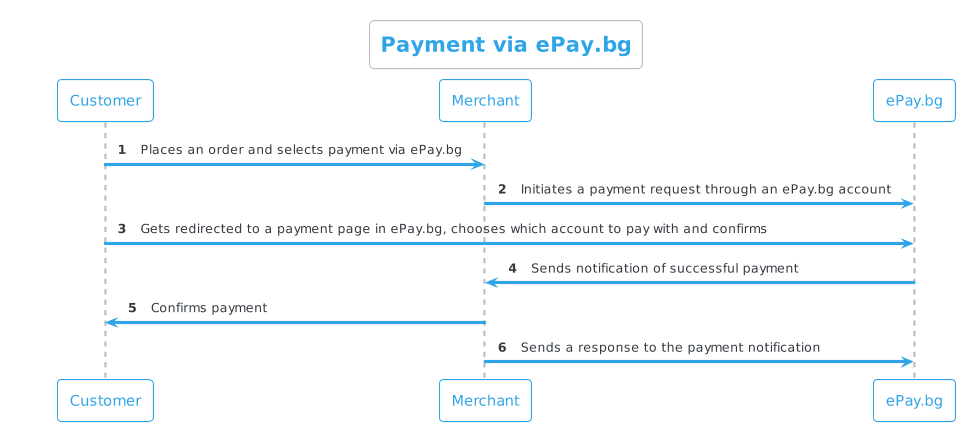
The customer makes the payment by choosing a means of payment (registered bank card or account) and confirms the payment with his password and other information if required. The customer has two options - to pay the obligation immediately or refuse it.
In case the customer does not log into the ePay.bg system or makes an unsuccessful attempt, the payment request is not recorded in the system.
Important!
For payment by registered users in ePay.bg, the request must be sent with PAGE=paylogin.
Payment by bank card¶¶
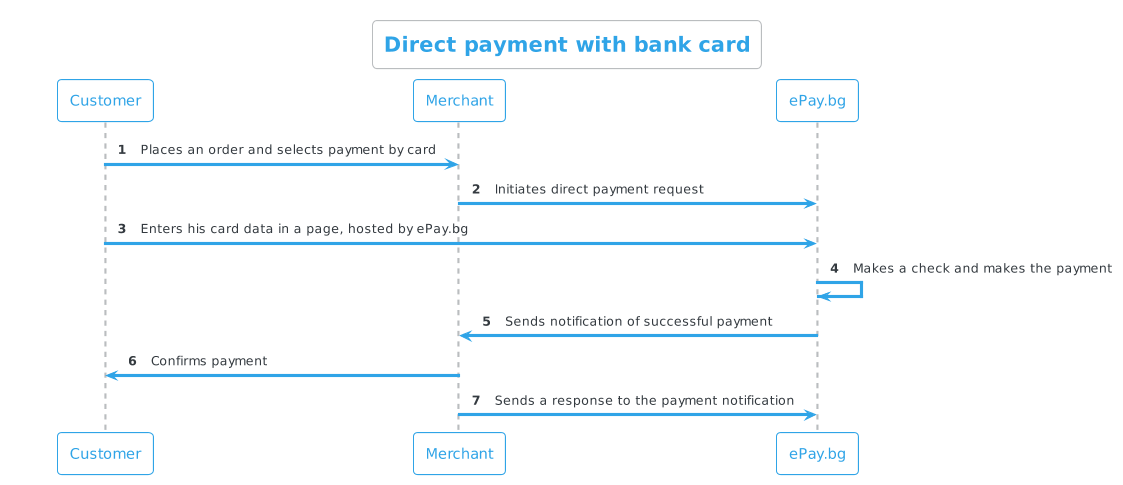
The customer makes the payment by entering information about his bank card on the page hosted by ePay.bg and confirming the payment.
Important!
For direct payment by bank cards, the request must be sent with PAGE=credit_paydirect.
Payment via EasyPay checkout¶¶
ePay.bg automatically generates a 10-digit code for each request submitted by the merchant. To pay via the EasyPay cash register or at an ATM, it is necessary to use the 10-digit payment code generated for the relevant order.
ATM payment¶¶
To pay at an ATM, the customer should visit an ATM and select from its menu:
- "Other Services" menu
- Select the "B-Pay" menu
- Enter merchant code – 60000
- Enter the 10-digit order payment code (the same code as when paying at the EasyPay checkout)
To pay at an ATM, a request for payment via EasyPay is prepared, which generates a 10-digit code.
Communication scheme¶¶
Production environment¶¶
| Method | Address | Description |
|---|---|---|
| POST | https://www.epay.bg/ | Bulgarian language version |
| POST | https://www.epay.bg/en/ | English language version |
To run the service in a production environment, you must:
- To have a contract with ePay.bg for accepting payments.
- To have a secret word (
SECRET) which is obtained with phone registration and dpass. - Use the CIN from your ePay.bg account - visible on the home page - Customer number (CIN).
- Add a notification address by sending an email to Commercial Department - merchant@epay.bg containing your CIN and notification URL.
Notification URL / secret word
The merchant can find the notification URL and secret in his https://epay.bg/ profile without being able to change them. - The change is made with a request to Commercial Department - merchant@epay.bg.
In a demo environment, the merchant himself can set a notification address.
Payment request¶¶
| Parameter | Type | Description | Optionality |
|---|---|---|---|
| PAGE | string | paylogin - for payment by registered userscredit_paydirect - for direct payment with payment cards. "ePay World" |
Mandatory |
| ENCODED | string | Base64-encoded (RFC 3548) payment request, EOL=''. |
Mandatory |
| CHECKSUM | string | Checksum on ENCODED generated as HMAC with SHA-1 algorithm and merchant's secret word. |
Mandatory |
| LANG | string | ePay.bg page language bg,en. |
Optional |
| SIGNATURE | string | Digital signature on ENCODED generated with merchant's private key (RSA, 1024/2048/4096 bits). The use of digital signature requires that the merchant has submitted a certificate in the X509 format to the system. |
Optional |
| URL_OK | string | URL to which the customer will be forwarded in case they confirm the payment (does not guarantee that the payment has been made). | Optional |
| URL_CANCEL | string | URL to which the customer will be forwarded in case he declines the payment for now (can pay or decline later, but not after the date specified by the merchant). | Optional |
Parameters in ENCODED
| Parameter | Type | Description | Optionality |
|---|---|---|---|
| MIN | int | Customer Identification Number (CIN) | Mandatory |
| string | Email of the merchant in the system | Optional | |
| INVOICE | int | Invoice Number; unique to merchant | Mandatory |
| AMOUNT | float | Valid amount > 0.01 (eg: 22, 22.8, 22.80) | Mandatory |
| CURRENCY | string | Accepted currencies are BGN, USD, or EUR; if not provided it defaults to BGN |
Optional |
| EXP_TIME | datetime | Payment end date/time; format DD.MM.YYYY[hh:mm[:ss]] |
Mandatory |
| DESCR | string | Description up to 100 characters; CP1251 characters if no other ENCODING |
Optional |
| ENCODING | encoding | Encoding of the DESCR parameter. Only utf-8 is accepted; can also be passed as an HTTP parameter |
Optional |
Sample request for payment by bank card
1 2 3 4 5 6 7 8 9 10 11 12 13 14 15 16 17 18 19 20 21 22 23 24 |
# '' for EOL (def. is "\n") DATA = MIN=1000000000 EMAIL=a@merch.bg INVOICE=123456 AMOUNT=22.80 CURRENCY=BGN EXP_TIME=01.08.2020 DESCR=Test ENCODING=utf-8 $ENCODED = encode_base64('DATA'); # Generate checksum $CHECKSUM = hmac_hex($ENCODED, $secret, \&sha1); <form action="https://www.epay.bg/" method=post> <input type=hidden name=PAGE value="credit_paydirect"> <input type=hidden name=LANG value="[LANG]"> <input type=hidden name=ENCODED value="[$ENCODED]"> <input type=hidden name=CHECKSUM value="[$CHECKSUM]"> <input type=hidden name=URL_OK value="http://..."> <input type=hidden name=URL_CANCEL value="http://..."> </form> |
Payment notification¶¶
To receive real-time notifications about the status of payments, you need to develop a Payment Notification.
WEB API - Payment via EasyPay
https://kb.epay.bg/en/web/easypay/
Payment via EasyPay
General information¶¶
- Client - The end user of the service
- Merchant (WEB merchant) - A legal entity that has concluded a contract with ePay.bg
- The files cited in the documentation can be downloaded from the "Demo package" link under the login button at https://demo.epay.bg/
Description of the payment process¶¶
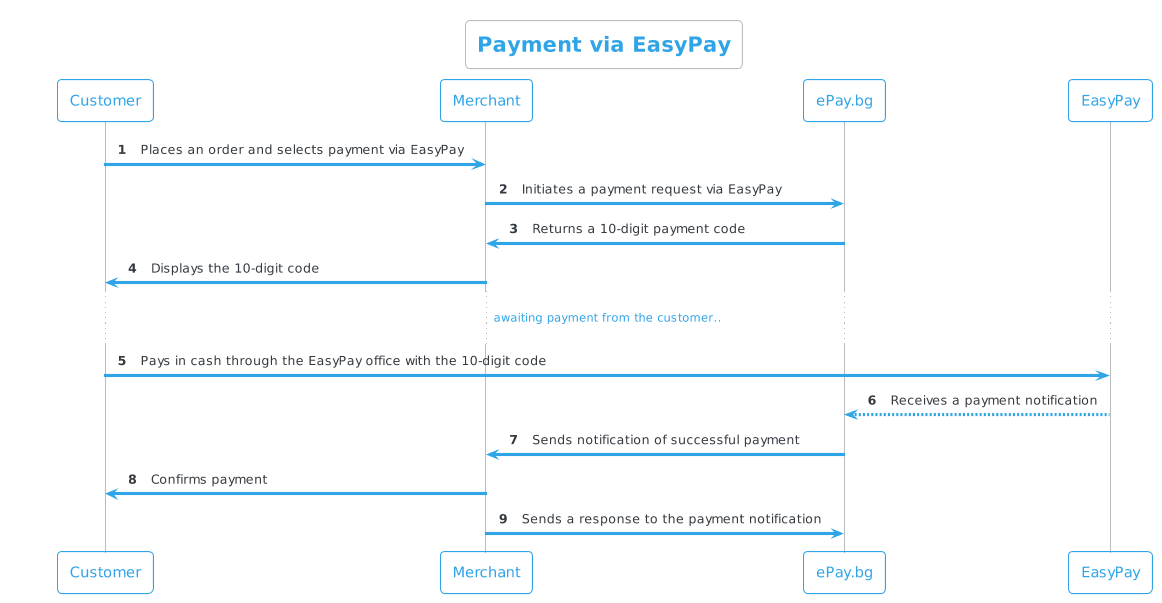
- A client of a WEB merchant places an order in his electronic store.
- After finishing the order, the customer selects "Pay at an EasyPay office".
- The merchant sends an HTTP GET payment request to ePay.bg URL (hidden from the client)
- In the case of a correctly submitted request, ePay.bg returns to the merchant a 10-digit payment code in EasyPay in the same HTTP session.
- The merchant displays this code on his site. This is the code for the customer to go to the EasyPay checkout and make the payment.
- ePay.bg monitors the status of the registered/recorded pending obligations and upon payment/rejection of the payment, a notification is sent to the merchant regarding the status of the respective request. System notifications are sent to ports:
- 80 for HTTP
- 443 for HTTPS
- Upon receiving a notification from ePay.bg, the merchant must form a corresponding response. If the notification is received again, the first response returned is repeated.
Info
Payments with a 10-digit code can also be made at an EasyPay ATM.
Communication scheme¶¶
Each registered merchant in the ePay.bg system has
- Alphanumeric secret word of length 64 (
secret) - Customer Identification Number (
CIN)
The merchant can find them in his https://epay.bg/ profile without being able to change them.
Production environment¶¶
| Method | URL |
|---|---|
| GET | https://www.epay.bg/ezp/reg_bill.cgi |
Demo environment¶¶
| Method | URL |
|---|---|
| GET | https://demo.epay.bg/ezp/reg_bill.cgi |
Simulate a payment made with a 10-digit code at an EasyPay office
https://demo.epay.bg/ezp/pay_bill.cgi?ACTION=PAY&IDN=1234567890
| Parameter | Type | Description | Optionality |
|---|---|---|---|
| ACTION | PAY | Simulate Payment | Mandatory |
| IDN | int | The resulting payment code | Mandatory |
You should get STATUS=PAID on the notification URL you specified.
Payment request¶¶
| Parameter | Type | Description | Optionality |
|---|---|---|---|
| ENCODED | string | Base64-encoded (RFC 3548) payment request, EOL=''. |
Mandatory |
| CHECKSUM | string | Checksum on ENCODED generated as HMAC with SHA-1 algorithm and the merchant's secret word. |
Mandatory |
Parameters in ENCODED
| Parameter | Type | Description | Optionality |
|---|---|---|---|
| MIN | int | Customer Identification Number (CIN) | Mandatory |
| string | Email of the merchant in the system | Optional | |
| INVOICE | int | InvoiceNumber; unique to merchant | Mandatory |
| AMOUNT | float | Valid Amount > 0.01 (eg: 22, 22.8, 22.80) | Mandatory |
| CURRENCY | string | Accepted currencies are BGN, USD or EUR; if not provided it defaults to BGN |
Optional |
| EXP_TIME | datetime | Payment End Date/Time; format DD.MM.YYYY[hh:mm[:ss]] |
Mandatory |
| DESCR | string | Description up to 100 characters; CP1251 characters if no other ENCODING |
Optional |
| ENCODING | encoding | encoding of DESCR parameter; only utf-8 is accepted, it can also be passed as an HTTP parameter |
Optional |
Important
Allow enough time for the EXP_TIME request to be valid for the customer to go to an EasyPay checkout.
Sample request
1 2 3 4 5 6 7 8 9 10 11 12 13 14 15 16 17 18 19 20 21 |
# '' for EOL (def. is "\n") DATA = MIN=1000000000 EMAIL=a@merch.bg INVOICE=123456 AMOUNT=22.80 CURRENCY=BGN EXP_TIME=01.08.2020 DESCR=Test ENCODING=utf-8 $ENCODED = encode_base64('DATA'); # Generate checksum $CHECKSUM = hmac_hex($ENCODED, $secret, \&sha1); <form action="https://www.epay.bg/" method=post> <input type=hidden name=LANG value="[LANG]"> <input type=hidden name=ENCODED value="[$ENCODED]"> <input type=hidden name=CHECKSUM value="[$CHECKSUM]"> </form> |
Change timeout to 10-digit code¶¶
Each 10-digit code is valid until expiration_time.
Change expiration time to a 10-digit code serves to extend the duration or disable it.
Payment notification¶¶
To receive real-time notifications about the status of payments, you need to develop Payment Notification.
WEB API - Payment Notification
https://kb.epay.bg/en/web/notify/
Payment Notification
The payment notice should be implemented as a final step to:
- Online Payment
- Payment via EasyPay
- Payment of a money transfer from merchant to customer via ePay.bg
- Payment of a money transfer from merchant to customer via EasyPay
After the payment request has been registered for the customer, the system will notify the Merchant about the status of the payment: "Paid" or "Expired". If the Customer does not confirm the request before the submitted cut-off date, it will be marked as expired.
A request with a given INVOICE can enter the system only once and is waiting for "Confirm" from the customer.
The system notification is sent to a URL specified by the Merchant as an HTTP POST request, to which a response is returned by the Merchant in the same HTTP session.
Notifications are sent to addresses with port 80 (HTTP) or 443 (HTTPS).
Info
If the Merchant has not declared a URL on which to receive payment notifications, does not want or is unable to process these notifications, then the Merchant can view the status of payment requests in the ePay.bg system.
Production environment¶¶
To request a notification URL, send an email to Commercial Department - merchant@epay.bg containing your CIN and notification URL.
Demo environment¶¶
In the Demo environment, the Merchant himself can set a notification address.
Payment notification¶¶
| Method | URL |
|---|---|
| POST | [Notification URL] |
| Parameter | Type | Description | Optionality |
|---|---|---|---|
| ENCODED | string | Base64-encoded (RFC 3548) payment request, EOL='' |
Mandatory |
| CHECKSUM | string | Checksum on ENCODED generated as HMAC with SHA-1 algorithm and the merchant's secret word. |
Mandatory |
Parameter ENCODED
| Parameter | Type | Description | Optionality |
|---|---|---|---|
| INVOICE | string | Invoice number from the payment request | Mandatory |
| STATUS | string | Payment Status PAID, DENIED, EXPIRED |
Mandatory |
| PAY_TIME | datetime | YYYYMMDDhhmmss Date/Hour/Sec of Payment |
Mandatory (when paid) |
| STAN | int | [6 digits]Transaction Number |
Mandatory (when paid) |
| BCODE | string | [6 digits/letters]BORICA Authorization Code |
Mandatory (when paid) |
PerlPHP
1 2 3 4 5 6 7 8 9 10 11 12 |
{ $data = decode_base64($ENCODED); # Calculation of the checksum # Must $CHECKSUM_CALC == $CHECKSUM $CHECKSUM_CALC = hmac_hex($ENCODED, $secret, \&sha1); # Digital signature verification use Crypt::OpenSSL::RSA; $rsa_pub = Crypt::OpenSSL::RSA->new_public_key(EPAY_PUBLIC_KEY_DATA); $rsa_pub->verify($ENCODED, $SIGNATURE); } |
1 2 3 4 5 6 7 8 9 10 11 12 13 |
{ $data = base64_decode($ENCODED); # Calculation of the checksum # Must $CHECKSUM_CALC == $CHECKSUM $CHECKSUM_CALC = hmac('sha1', $ENCODED, $secret); # hmac function code can be seen in demo.php # Digital signature verification $pkey_obj = openssl_get_publickey($EPAY_CERT_DATA); openssl_verify($ENCODED, $SIGNATURE, $pkey_obj); } |
Examples¶¶
Notification of payment made
Encoded data:
encoded=SU5WT0lDRT0xNDAyOlNUQVRVUz1QQUlEOlBBWV9USU1FPTIwMjIwNjI5MTQ1MjU3OlNUQU49MDAwMDAwOkJDT0RFPTAwMDAwMAo%3D&checksum=46703be53c26149b0f28bcb1a38d1f8fdbb096de
After decoding the data, the text is obtained from which the parameters we send can be seen:
INVOICE=1402:STATUS=PAID:PAY_TIME=20220629145257:STAN=000000:BCODE=000000
Notification with more than one INVOICE in one request
There are cases where the system sends more than one INVOICE in the same request:
INVOICE=162319945:STATUS=PAID:PAY_TIME=20230626002551:STAN=036221:BCODE=036221
  INVOICE=162322355:STATUS=PAID:PAY_TIME=20230626002551:STAN=036227:BCODE=036227
Notification for expired time
encoded=SU5WT0lDRT02MTY1NjQyOTc2MzpTVEFUVVM9RVhQSVJFRAo%3D&checksum=2cf0b859969c55c1ed2d16fcc4446d7455305010
After decoding the encoded parameter, the text that contains this notification is visible:
INVOICE=61656429763:STATUS=EXPIRED
Other decoded values of encoded
PAIDDENIEDEXPIRED
INVOICE=123456:STATUS=PAID:PAY_TIME=YYYYMMDDhhmmss:STAN=[6 digits]:BCODE=[6 digits/letters]
INVOICE=123457:STATUS=DENIED
INVOICE=123457:STATUS=EXPIRED
Response to payment notification¶¶
For each invoice number in the notification, the merchant must return a status.
| Parameter | Type | Description | Optional |
|---|---|---|---|
| INVOICE | string | Invoice number from the payment request | Mandatory |
| STATUS | string | OK - successfully received notificationERR - description of the errorNO - non-existent invoice number |
Mandatory |
Info
When STATUS = OK or STATUS = NO is returned, the system stops sending notifications for the respective invoice.
The system sends notifications for 14 days.
Examples¶¶
OKERRNO
INVOICE=123456:STATUS=OK
INVOICE=123457:STATUS=ERR
INVOICE=123458:STATUS=NO
In response to the notification, the merchant may return a STATUS=ERR response if it wishes to cause the same notification to be repeated.
ERR=a description of the global error (e.g. invalid CHECKSUM)
Time-out for notifications¶¶
If ePay.bg does not mark an invoice as received by the merchant (for example ERR status returned or failed communication), the system will try to send the failed notifications again.
Scheme for sending notifications on a given invoice:
- 5 attempts in < 1 minute
- 4 attempts in 15 minutes
- 5 attempts in 1 hour
- 6 attempts in 3 hours
- 4 attempts in 6 hours
- 1 attempt per day
WEB API - Preauthorization
https://kb.epay.bg/en/web/preauth/
Preauthorization¶¶
What is preauthorization? - Prepayment, which ensures that the customer has sufficient funds or credit limit to cover the transaction. It is often used when the final payment amount is uncertain, such as hotel reservations, car rentals, or dining in restaurants.
Description of the process¶¶
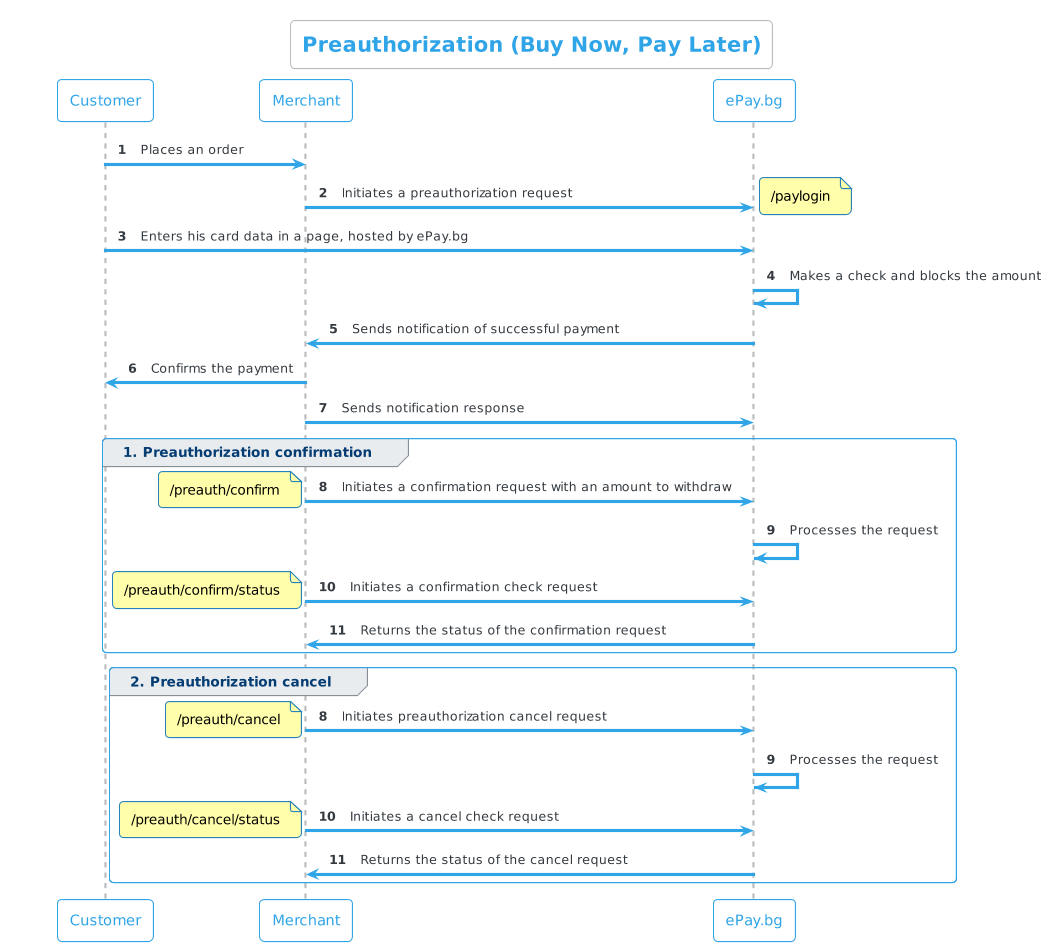
- A customer initiates a payment process on the merchant's website or platform by selecting a credit or debit card payment option.
- The merchant initiates a Preauthorization request by sending the required information.
- The customer is redirected to a payment page where they must enter their card details.
- After successfully entering the card details, the amount requested for reauthorization will be blocked. This means that this amount cannot be spent or made available to the customer until a confirmation or cancel request is made within the next 30 days.
- After the 30-day period expires and no action is taken by the merchant, the request will be automatically cancelled.
- ePay.bg sends a confirmation (notification) to the merchant, informing him that the preauthorization request has been paid or cancelled.
- To receive real-time notifications about the status of payments, you need to develop a Payment Notification.
- With this notification, the merchant will have information if the amount is withheld.
- For each reauthorization request, it is mandatory to send only one of the requests:
- Confirmation request
- Cancel request
- After each confirmation or cancel request, the merchant must send a check:
- Preauthorization confirmation check
- Preauthorization cancel check
Important
You need to have Payment Notification developed to receive real-time information about customer payments.
If you do not have a payment notice developed and the customer for some reason fails to complete the preauthorization request (did not enter his data, refused, no money or time expired), and at the same time you try to take the amount (confirmation) or cancel, then you will receive an error.
Communication scheme¶¶
Production environment¶¶
| Method | WEB_ADDRESS |
|---|---|
| POST | https://www.epay.bg/v3main/ |
Demo environment¶¶
Entry point for testing purposes.
| Method | WEB_ADDRESS |
|---|---|
| POST | https://demo.epay.bg/xdev/web/ |
The following cards with a correct validity date (any future date) and any CVC code can be used for test requests:
For successful payment:
Mastercard: 5100770000000022
VISA: 4341792000000044
For VISA cards
Code 111111 may be required for tests with an amount over BGN 30 and the need for password confirmation.
For failed payment:
Mastercard: 5555000000070019
Preauthorization request¶¶
| Method | Address |
|---|---|
| POST | WEB_ADDRESS/paylogin |
| Parameters | Type | Description | Optionality |
|---|---|---|---|
| ENCODED | string | Base64-encoded (RFC 3548) payment request, EOL=''. |
Mandatory |
| CHECKSUM | string | Checksum on ENCODED generated as HMAC with SHA-1 algorithm and merchant's secret word. |
Mandatory |
Parameters in ENCODED
| Parameters | Type | Description | Optionality |
|---|---|---|---|
| MIN | int | Customer Identification Number (CIN) | Mandatory |
| string | Email of the merchant in the system | Optional | |
| INVOICE | int | Invoice number; unique to the merchant | Mandatory |
| AMOUNT | float | Valid amount > 0.01 (eg: 22, 22.8, 22.80) | Mandatory |
| CURRENCY | string | Accepted currencies are BGN, USD, or EUR; if not provided it defaults to BGN |
Optional |
| EXP_TIME | datetime | Payment end date/time; format DD.MM.YYYY[hh:mm[:ss]] |
Mandatory |
| DESCR | string | Description up to 100 characters; CP1251 characters if no other ENCODING |
Optional |
| ENCODING | encoding | Encoding of the DESCR parameter. Only utf-8 is accepted; can also be passed as an HTTP parameter |
Optional |
| PREAUTH | int | = 1 - requests payment by preauthorization |
Mandatory |
Note
The protocol formation is the same as in Online payment, the only difference is that PREAUTH=1 is added to ENCODED in this request.
Response
OKProcessingError
STATUS=OK
STATUS=PROCESSING
ERR=Description of the error
For tests you must submit and force_credit_paydirect=1.
Confirmation request¶¶
| Method | Address |
|---|---|
| POST | WEB_ADDRESS/preauth/confirm |
Information
In the event that a smaller amount is submitted, it is entered in the accounts and the balance is released.
| Parameters | Type | Description | Optionality |
|---|---|---|---|
| ENCODED | string | Base64-encoded (RFC 3548) payment request, EOL=''. |
Mandatory |
| CHECKSUM | string | Checksum on ENCODED generated as HMAC with SHA-1 algorithm and merchant's secret word. |
Mandatory |
Parameters in ENCODED
| Parameters | Type | Description | Optionality |
|---|---|---|---|
| MIN | int | MIN from the original preauthorization request |
Mandatory |
| INVOICE | int | INVOICE from the original preauthorization request |
Mandatory |
| ORIGINAL_AMOUNT | float | Amount from the preauthorization | Mandatory |
| CONFIRM_AMOUNT | float | Amount to be actually taken at confirmation; must be less than or equal to ORIGINAL_AMOUNT |
Mandatory |
Preauthorization confirmation check¶¶
| Method | Address |
|---|---|
| POST | WEB_ADDRESS/preauth/confirm/status |
| Parameters | Type | Description | Optionality |
|---|---|---|---|
| ENCODED | string | Base64-encoded (RFC 3548) payment request, EOL=''. |
Mandatory |
| CHECKSUM | string | Checksum on ENCODED generated as HMAC with SHA-1 algorithm and merchant's secret word. |
Mandatory |
Parameters in ENCODED
| Parameters | Type | Description | Optionality |
|---|---|---|---|
| MIN | int | MIN from the original preauthorization request |
Mandatory |
| INVOICE | int | INVOICE from the original preauthorization request |
Mandatory |
| ORIGINAL_AMOUNT | float | Amount from the preauthorization | Mandatory |
| CONFIRM_AMOUNT | float | The amount submitted for claim at confirmation request | Mandatory |
Cancel request¶¶
| Method | Address |
|---|---|
| POST | WEB_ADDRESS/preauth/cancel |
| Parameters | Type | Description | Optionality |
|---|---|---|---|
| ENCODED | string | Base64-encoded (RFC 3548) payment request, EOL=''. |
Mandatory |
| CHECKSUM | string | Checksum on ENCODED generated as HMAC with SHA-1 algorithm and merchant's secret word. |
Mandatory |
Parameters in ENCODED
| Parameters | Type | Description | Optionality |
|---|---|---|---|
| MIN | int | MIN from the original preauthorization request |
Mandatory |
| INVOICE | int | INVOICE from the original preauthorization request |
Mandatory |
| ORIGINAL_AMOUNT | float | Amount from the preauthorization | Mandatory |
| REV_AMOUNT | float | =ORIGINAL AMOUNT (Amount from the preauthorization) |
Mandatory |
Preauthorization cancel check¶¶
| Method | Address |
|---|---|
| POST | WEB_ADDRESS/preauth/cancel/status |
| Parameters | Type | Description | Optionality |
|---|---|---|---|
| ENCODED | string | Base64-encoded (RFC 3548) payment request, EOL=''. |
Mandatory |
| CHECKSUM | string | Checksum on ENCODED generated as HMAC with SHA-1 algorithm and merchant's secret word. |
Mandatory |
Parameters in ENCODED
| Parameters | Type | Description | Optionality |
|---|---|---|---|
| MIN | int | MIN from the original preauthorization request |
Mandatory |
| INVOICE | int | INVOICE from the original preauthorization request |
Mandatory |
| ORIGINAL_AMOUNT | float | Amount from the preauthorization | Mandatory |
| REV_AMOUNT | float | =ORIGINAL AMOUNT (Amount from the preauthorization) |
Mandatory |
WEB API - Change Expiring Time
https://kb.epay.bg/en/web/expiration_time/
Change the expiration time of 10-digit codes¶¶
General information¶¶
- Client - The end user of the service
- Merchant - A legal entity that has concluded a contract with ePay.bg
- The files cited in the documentation can be downloaded from the "Demo package" link under the login button at https://demo.epay.bg/
Process description¶¶
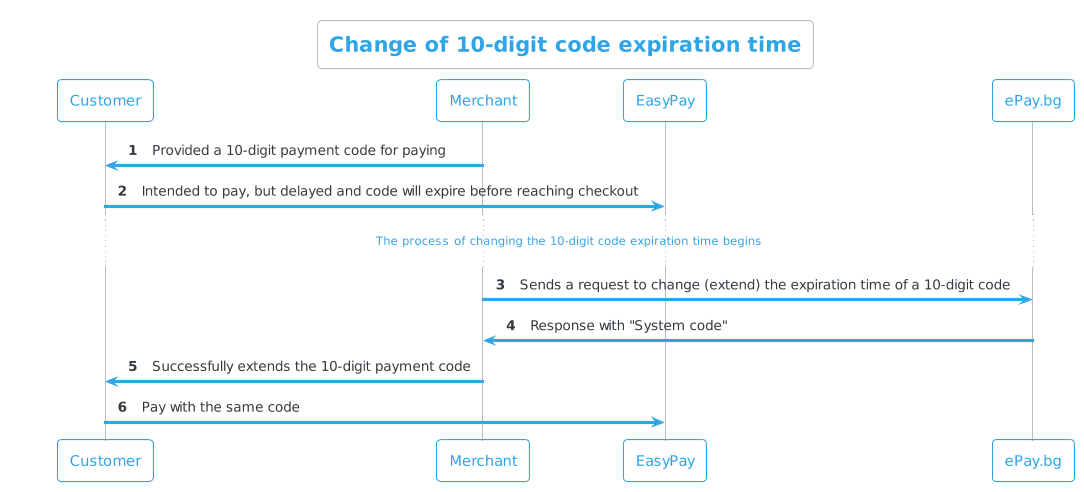
The request serves to extend the expiration time of an already existing 10-digit code or invalidate it.
- A merchant wants to extend the expiration time of a 10-digit code he has provided to a customer.
- The merchant sends an HTTP GET request to the given URL.
- Receives a response from ePay.bg about successfully changing the expiration time of the 10-digit code or an error with a description of the problem.
Communication scheme¶¶
Production environment¶¶
| Method | WEB_ADDRESS |
|---|---|
| GET | https://www.epay.bg/v3main |
Demo environment¶¶
| Method | WEB_ADDRESS |
|---|---|
| GET | https://demo.epay.bg/xdev/web |
Request to change the expiration time¶¶
| Method | Address |
|---|---|
| GET | WEB_ADDRESS/paylogin/request/update |
| Parameter | Type | Description | Optionality |
|---|---|---|---|
| ENCODED | string | Base64-encoded (RFC 3548) payment request, EOL=''. |
Mandatory |
| CHECKSUM | string | Checksum on ENCODED, generated as HMAC with SHA-1 algorithm and the merchant's secret word. |
Mandatory |
Parameters in ENCODED
| Parameter | Type | Description | Optionality |
|---|---|---|---|
| MIN | int | Customer Identification Number (CIN) | Mandatory |
| INVOICE | int | Invoice Number; unique to merchant | Mandatory |
| EXP_TIME | datetime | Payment End Date/Time; format DD.MM.YYYY[hh:mm[:ss]] |
Mandatory |
Info
In case an EXP_TIME greater than 30 days from the moment of execution of the current request is submitted, EXP_TIME = now + 30 days is automatically set.
Example code for making the request
PerlPHP
1 2 3 4 5 6 7 |
{ # Encoding the request $ENCODED = encode_base64('DATA', ''); # '' за EOL (def. е "\n") # Generate checksum $CHECKSUM = hmac_hex($ENCODED, $secret, \&sha1); } |
1 2 3 4 5 6 7 8 9 |
{ # Encoding the request $ENCODED = base64_encode('DATA'); # Generate checksum $CHECKSUM = hmac('sha1', $ENCODED, $secret); # hmac function code can be seen in demo.php } |
Response
OKERR
SYS_CODE=OK
ERR=Error description
Code invalidation¶¶
For a 10-digit code invalidation, past time must be submitted in the EXP_TIME parameter.
WEB API - Ordering a Bank Transfer
https://kb.epay.bg/en/web/bank_transfer/
Request to order a bank transfer¶¶
Process description¶¶
- The merchant prepares a packet that it sends to a given URL as an HTTP GET request.
- Upon submission of a correct request, in the same HTTP session, ePay.bg will return to the merchant "System code for the payment made at ePay.bg".
Each registered merchant in the ePay.bg system has
- Alphanumeric secret word of length 64 (
secret) - Customer Identification Number (
CIN).
The merchant can find them in his https://epay.bg/ profile without being able to change them.
Communication scheme¶¶

Production environment¶¶
| Method | URL |
|---|---|
| GET | https://www.epay.bg/send/send_vnbel.cgi |
Demo environment¶¶
| Method | URL |
|---|---|
| GET | https://demo.epay.bg/send/send_vnbel.cgi |
Request to order a bank transfer¶¶
| Parameter | Type | Description | Optionality |
|---|---|---|---|
| ENCODED | string | Base64-encoded (RFC 3548) payment request, EOL=''. |
Mandatory |
| CHECKSUM | string | Checksum on ENCODED, generated as HMAC with SHA-1 algorithm and the merchant's secret word. |
Mandatory |
Parameters in ENCODED
| Parameter | Type | Description | Optionality |
|---|---|---|---|
| MIN | int | Customer Identification Number (CIN) | Mandatory |
| MEMAIL | string | Email of the merchant in the system | Mandatory |
| INVOICE | string | Unique request number up to 64 charactersAccepted: numbers, Latin | Mandatory |
| RECIPIENT | string | Recipient of the order up to 35 charactersAccepted: Cyrillic, Latin, numbers, spaces, dashes, commas, periods | Mandatory |
| IBAN | string | Recipient's valid IBAN | Mandatory |
| AMOUNT | float | Valid amount > 0.01 (eg: 22, 22.8, 22.80) | Mandatory |
| STATEMENT | string | Reason up to 70 charactersAccepted: Cyrillic, Latin, numbers, spaces, dashes, commas, periods | Mandatory |
| CURRENCY | string | Accepted currency is BGN; if not supplied defaults to BGN |
Optional |
| ENCODING | encoding | encoding of RECIPIENT and STATEMENT; only accepted with utf-8 |
Optional |
Example code for making the request
PerlPHP
1 2 3 4 5 6 7 |
{ # Encoding the request $ENCODED = encode_base64('DATA', ''); # '' for EOL (def. is "\n") # Generate checksum $CHECKSUM = hmac_hex($ENCODED, $secret, \&sha1); } |
1 2 3 4 5 6 7 8 9 |
{ # Encoding the request $ENCODED = base64_encode('DATA'); # Generate checksum $CHECKSUM = hmac('sha1', $ENCODED, $secret); # hmac function code can be found in demo.php } |
Response
OKERR
SYS_CODE=1234567890
ERR=Error description
WEB API - Deposit Slip
https://kb.epay.bg/en/web/vnbel/
Deposit slip - payment request
General information¶¶
- Client - The end user of the service
- Merchant (WEB merchant) - A legal entity that has concluded a contract with ePay.bg
- The files cited in the documentation can be downloaded from the "Demo package" link under the login button at https://demo.epay.bg/
Each registered merchant in the ePay.bg system has
- Alphanumeric secret word of length 64 (
secret) - Customer Identification Number (
CIN)
The merchant can find them in his https://epay.bg/ profile without being able to change them.
Cash payment via EasyPay¶¶
Description of the process¶¶
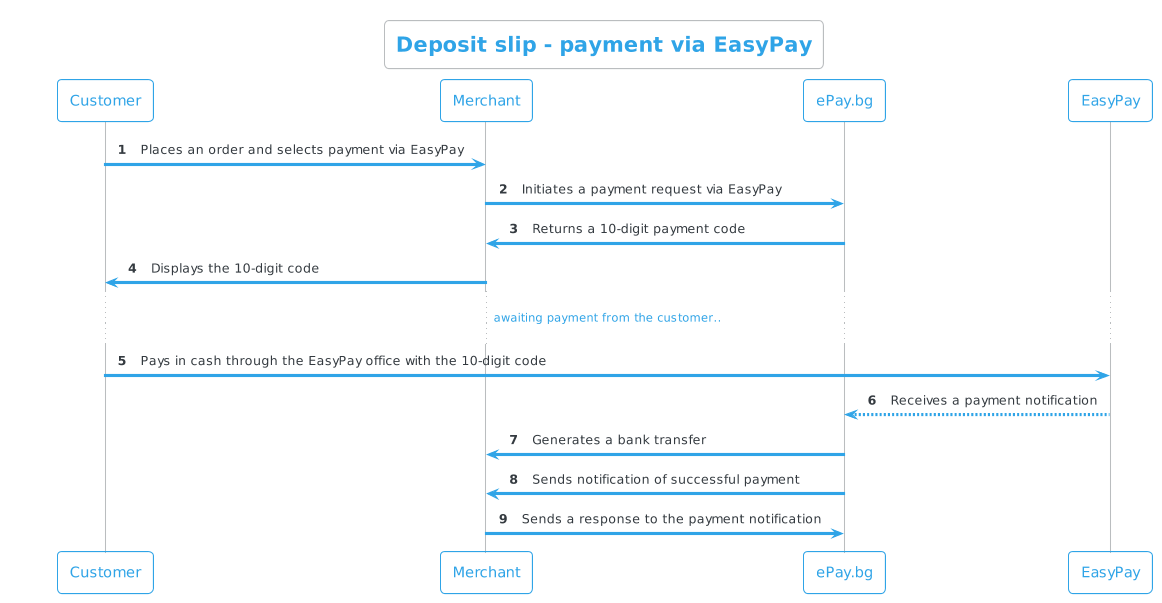
The merchant sends an HTTP GET request for the money transfer to the given URL.
- Request for payment to a budget organization (merchant).
- On the site of the organization (merchant), the customer selects the desired service and as a payment method - EasyPay.
- The merchant prepares a package (payment request) that he sends to ePay.bg URL as an HTTP GET request. In the same HTTP session, ePay.bg returns a "Payment code" to the merchant. The merchant displays this code on his site, through which the customer can pay in cash in EasyPay.
- Upon payment, ePay.bg sends a notification to the customer and generates a bank transfer with the data from the request.
- ePay.bg monitors the status of registered/recorded pending obligations and upon payment, refusal or expiration of the payment time, sends a notification to the merchant about the status of each payment. System notifications are sent to ports:
- 80 for HTTP
- 443 for HTTPS
- Upon receiving a notification from ePay.bg, the merchant must form a corresponding response.
Communication scheme¶¶
Production environment
| Method | URL |
|---|---|
| GET | https://www.epay.bg/ezp/reg_vnbel.cgi |
Demo environment
| Method | URL |
|---|---|
| GET | https://demo.epay.bg/ezp/reg_bill.cgi |
Payment request¶¶
| Parameter | Description | Optionality |
|---|---|---|
| ENCODED | Base64-encoded (RFC 3548) payment request, EOL=" " | Mandatory |
| CHECKSUM | Checksum on ENCODED generated as HMAC with SHA-1 algorithm and merchant SECRET word |
Mandatory |
Parameters in ENCODED
| Parameter | Type | Description | Optionality |
|---|---|---|---|
| MIN | int | Merchant ID - Corresponds to the CIN in the merchant's profile in ePay.bg | Mandatory |
| INVOICE | int | Invoice number; unique to the merchant | Mandatory |
| AMOUNT | float | Valid amount > 0.01 (eg: 22, 22.8, 22.80) | Mandatory |
| EXP_TIME | datetime | Final date/time for payment, up to 30 days after the date of the request; format DD.MM.YYYY [hh:mm [:ss]] |
Mandatory |
| DESCR | string | Description up to 100 characters; encoding CP1251 | Optional |
| MERCHANT | string | Recipient of the order | Mandatory |
| IBAN | string | A valid IBAN of the recipient | Mandatory |
| BIC | string | BIC of the receiving bank | Mandatory |
| STATEMENT | string | Payment description | Mandatory |
| PSTATEMENT | int | Payment code | Mandatory |
| OBLIG_PERSON | string | Name of the obligee; up to 26 characters | Mandatory |
| BULSTATEGNLNC | int | BULSTAT, EGN or LNC Only one of the three parameters is submitted! | Mandatory |
| DOC_NO | int | Document type and number | Mandatory |
| DOC_DATE | int | Document date: The parameter is submitted for document type - 2|3|6 |
Mandatory at: 2|3|6 |
| DATE_BEGIN | int | Start of period: The parameter is submitted for document type - 1|2|4|5 |
Mandatory at: 1|2|4|5 |
| DATE_END | int | End of period: The parameter is submitted for document type - 1|2|4|5 |
Mandatory at: 1|2|4|5 |
When submitting the request
- The parameters do not have to be in this order.
- If the payment is multi-line, the parameter
AMOUNTis replaced byTOTAL, and for each separate payment the amount is submitted with the parameterSUM1,SUM2,SUM3, respectively.
Sample request
PerlPHP
1 2 3 4 5 6 7 |
{ # Encoding the request $ENCODED = encode_base64('DATA', ''); # '' for EOL (def. е "\n") # Generate CHECKSUM $CHECKSUM = hmac_hex($ENCODED, $secret, \&sha1); } |
1 2 3 4 5 6 7 8 |
{ $data = base64_decode($ENCODED); # Calculating the checksum # $CHECKSUM_CALC == $CHECKSUM $CHECKSUM_CALC = hmac('sha1', $ENCODED, $secret); # hmac function code can be found in demo.php } |
Sample notification from ePay.bg
PaidExpiredDenied
INVOICE=123456:STATUS=PAID:PAY_TIME=YYYYMMDDhhmmss:STAN=[6 digits]:BCODE=[6 digits/letters]
INVOICE=123457:STATUS=EXPIRED
INVOICE=123457:STATUS=DENIED
| Parameter | Description |
|---|---|
| STAN | Transaction number, only when paying by card |
| BCODE | BORICA authorization code, only when paying by card |
Payment notification
STAN and BCODE have the value 000000 when the payment is not made by card.
Payment via ePay.bg¶¶
Amounts paid by customers are transferred to a bank account specified by the merchant in a Bulgarian bank. Payment is made via ePay.bg.
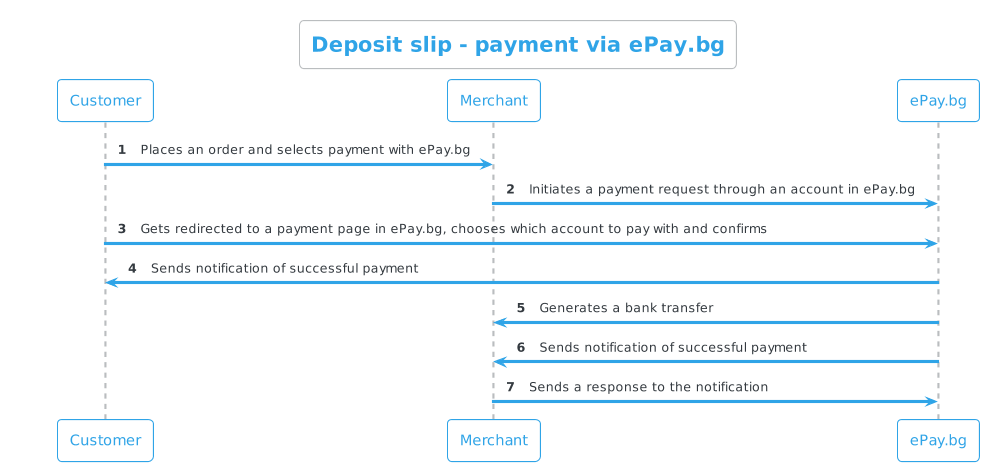
Description of the process¶¶
- Request for payment to a budget organization (merchant).
- On the site of the organization (merchant), the customer selects the desired service and as a payment method - online via ePay.bg.
- The merchant prepares a payment request, which he sends to the ePay.bg URL as an HTTP POST request.
- The customer is redirected to a payment page on ePay.bg, where he must select a payment method and confirm the payment with his password and other information, if required.
- Upon payment, ePay.bg sends a notification to the customer and generates a bank transfer with the data from the request.
- ePay.bg monitors the status of registered/recorded pending obligations and upon payment, refusal or expiration of the payment time, sends a notification to the merchant about the status of each payment. System notifications are sent to ports:
- 80 for HTTP
- 443 for HTTPS
- Upon receiving a notification from ePay.bg, the merchant must form a corresponding response.
Communication scheme¶¶
Production environment
| Method | URL |
|---|---|
| POST | https://www.epay.bg/ |
Payment request¶¶
| Parameter | Type | Description | Optionality |
|---|---|---|---|
| PAGE | string | paylogin |
Mandatory |
| MERCHANT | string | Recipient of the transferAccepted: Cyrillic, Latin, numbers, spaces, dashes, commas, periods | Mandatory |
| IBAN | string | A valid IBAN of the recipient | Mandatory |
| BIC | string | BIC of the receiving bank | Mandatory |
| TOTAL | float | Valid amount > 0.01 (eg: 22, 22.8, 22.80) | Mandatory |
| STATEMENT | string | ReasonAccepted: Cyrillic, Latin, numbers, spaces, dashes, commas, periods | Mandatory |
| PSTATEMENT | int | Valid payment type - 6 digits |
Optional |
| URL_OK | url | URL to which the customer will be forwarded in case they confirm the payment.It does not guarantee that payment has been made. | Optional |
| URL_CANCEL | url | The URL to which the customer will be redirected in case they decline the payment. | Optional |
Sample request
1 2 3 4 5 6 7 8 9 10 11 12 |
<form action="https://www.epay.bg/" method=post> <input type=hidden name=PAGE value="paylogin"> <input type=hidden name=MERCHANT value="[MERCHANT]"> <input type=hidden name=IBAN value="[IBAN]"> <input type=hidden name=BIC value="[BIC]"> <input type=hidden name=AMOUNT value="[AMOUNT]"> <input type=hidden name=STATEMENT value="[STATEMENT]"> <input type=hidden name=PSTATEMENT value="[PSTATEMENT]"> <input type=hidden name=URL_OK value="http://..."> <input type=hidden name=URL_CANCEL value="http://..."> <input type=submit> </form> |
Payment notification¶¶
To receive real-time notifications about the status of payments, you need to develop a Payment Notification.
WEB API - Money Send via EasyPay
https://kb.epay.bg/en/web/moneysend_easypay/
Payment of money transfer from merchant to the customer via EasyPay¶¶
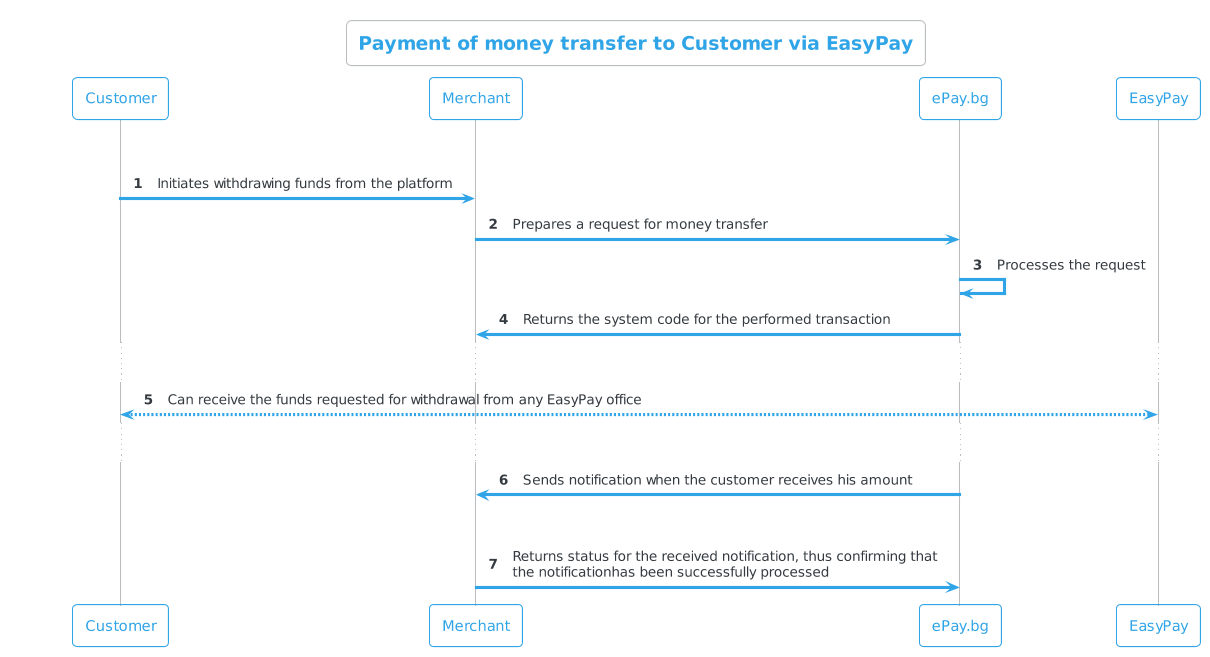
Process description¶¶
- The merchant prepares a packet (money transfer request) that it sends to a given URL as an HTTP GET request.
- Upon submission of a correct request, in the same HTTP session, ePay.bg will return to the merchant "System code for the payment made at ePay.bg".
- The money transfer is paid to the submitted recipient at any of the EasyPay cash desks.
- The ePay.bg system monitors the status of the registered/recorded money transfers and when they are paid out, a notification is sent from ePay.bg to the merchant about them.
- Upon receiving a notification from ePay.bg, the merchant must form a corresponding response.
Each registered merchant in the ePay.bg system has
- Alphanumeric secret word of length 64 (
secret) - Customer Identification Number (
CIN)
The merchant can find them in his https://epay.bg/ profile without being able to change them.
Communication scheme¶¶
Production environment¶¶
| Method | URL |
|---|---|
| GET | https://www.epay.bg/ezp/send.cgi |
Demo environment¶¶
| Method | URL |
|---|---|
| GET | https://demo.epay.bg/ezp/send.cgi |
Money transfer request via EasyPay¶¶
| Parameter | Description | Optionality |
|---|---|---|
| ENCODED | Base64-encoded (RFC 3548) payment request, EOL=" " | Mandatory |
| CHECKSUM | Checksum on ENCODED generated as HMAC with SHA-1 algorithm and merchant SECRET word |
Mandatory |
Parameters in ENCODED
| Parameter | Type | Description | Optionality |
|---|---|---|---|
| MIN | int | Customer Identification Number (CIN) | Mandatory |
| INVOICE | int | Invoice ID; numbers only | Mandatory |
| AMOUNT | float | Valid amount > 0.01 (eg: 22, 22.8, 22.80) | Mandatory |
| RCPT_NAME | string | Recipient name up to 100 characters;CP1251 characters if no other ENCODING is supplied |
Mandatory |
| RCPT_PID | int | PID of recipient | Mandatory |
| RCPT_ID_NO | int | Recipient's personal document number(identity card/driver's license/passport) | Mandatory |
| RCPT_ID_DATE | date | Issue date of recipient's personal document (identity card/driver's license/passport);format DD.MM.YYYY |
Mandatory |
| RCPT_ADDRESS | string | Recipient address up to 256 characters; CP1251 characters if no other ENCODING is supplied |
Optional |
| RCPT_PHONE | int | Recipient phone up to 16 characters | Optional |
| CURRENCY | float | Accepted currencies are BGN, USD, or EUR; if not supplied defaults to BGN |
Optional |
| DESCR | string | Transfer description up to 100 characters;CP1251 characters if no other ENCODING is supplied |
Optional |
| ENCODING | encoding | utf-8 or CP1251; if not supplied, defaults to CP1251 | Optional |
Additional parameter information:
INVOICE:
It serves to differentiate the different requests of the merchant. This ID must be unique for each new request
ENCODING:
If this parameter is not passed, the system defaults to expecting CP1251 characters in all description fields (DESCR, RCPT_NAME, RCPT_ADDRESS). For UTF-8 characters, ENCODING=utf-8 is supplied in the description fields.
It is mandatory to submit data about the recipient in the request
The request must contain Personal Identification Number and/or number of a valid Personal Identification Document of the recipient.
If a personal document is submitted, the date of issue is also required.
Response¶¶
If everything with the request is in order, ePay.bg will return to the merchant a system code for the completed transfer in the same HTTP session. The generated code is a signal to the merchant that the transfer was successfully ordered.
OKERR
SYS_CODE = 1234567890 (system code - digits only, up to 64 in length)
ERR = Error description
Retrying the request will not result in another transfer being ordered
No response or one with an empty value should not be a flag that the request to generate a transfer was not or was successful.
The merchant must repeat the request with the same data until receiving a response according to specification (SYS_CODE=123 or ERR=Error Description). Any repetition of a request with the same data will result in the same system code, meaning that repeating the request will not result in another transfer being ordered.
Notification from ePay.bg¶¶
When the transfer is paid out, the notification from the system is sent to a specified URL as an HTTP POST request, to which the merchant returns a response in the same HTTP session.
The merchant must have a specified URL for notification from ePay.bg if he wants to be notified of successful payments. If no URL address is set, the merchant will only be able to see the status of money transfers on his Microaccount - deposits from customers by 10-digit codes.
Only standard ports are allowed in the notification address:
- 80 for HTTP
- 443 for HTTPS
The address might look like this:
Response from the merchant after notification from ePay.bg
If the ePay.bg system does not receive a correct response from the merchant or does not receive one at all, it will continue to send the same notification until receiving a correct status for 14 days.
Scheme for sending notifications on a given INVOICE
- 5 attempts in < 1 minute
- 4 attempts in 15 minutes
- 5 attempts in 1 hour
- 6 attempts in 3 hours
- 4 attempts in 6 hours
- 1 attempt per day
Notification parameters from ePay.bg
| Parameter | Description |
|---|---|
| ENCODED | Base64-encoded (RFC 3548) payment request, EOL=" " |
| CHECKSUM | Checksum on ENCODED generated as HMAC with SHA-1 algorithm and merchant SECRET word |
Parameters in ENCODED
| Parameter | Description |
|---|---|
| INVOICE | Request ID |
| STATUS | PAID |
| PAY_TIME | Payout date in YYYYMMDDhhmmss format |
| STAN | Transaction number - always 000000 |
| BCODE | BORICA authorization code - always 000000 |
Sample notice from ePay.bg
encoded=SU5WT0lDRT0xMjM0NTY6U1RBVFVTPVBBSUQ6UEFZX1RJTUU9MjAxNzA3MTUxMzUxMjM6U1RBTj0wMDAwMDA6QkN
PREU9MDAwMDAw&checksum=a2468791e7a999d616f1d92f266346801ed8e82a
An example of a decoded value of encoded
INVOICE=123456:STATUS=PAID:PAY_TIME=20170715135123:STAN=000000:BCODE=000000
Response to notification¶¶
In the usual situation, the merchant is expected to return a STATUS=OK response, in which case the system stops the subsequent sending of the corresponding notification. By sending this status, the merchant confirms to ePay.bg that the notification has been successfully processed.
Output parameters
| Parameter | Description |
|---|---|
| INVOICE | Request ID |
| STATUS | OK, NO or ERR |
Possible values of the STATUS field
| Parameter | Description |
|---|---|
| OK | The message has been processed correctly |
| ERR | May be returned in the event of an error on the part of the merchant, due to which it could not save the notification |
| NO | If there is no such request (INVOICE) generated by the merchant |
Additional information about STATUS values
ERR:
If something is incorrect in the notification sent by ePay.bg, the merchant's system returns ERR=description. For example, it may return an invalid checksum - ERR=INVALID CHECKSUM. Upon receiving ERR, ePay.bg will continue to repeat the notification according to the described scheme.
NO:
Upon receiving this status, the ePay.bg system stops sending notifications for this INVOICE.
Examples¶¶
PerlPHP
1 2 3 4 5 6 7 |
{ # Encoding the request $ENCODED = encode_base64('DATA', ''); # '' for EOL (def. is "\n") # Generate checksum $CHECKSUM = hmac_hex($ENCODED, $secret, \&sha1); } |
1 2 3 4 5 6 7 |
{ # Encoding the request $ENCODED = base64_encode('DATA'); # Generate checksum $CHECKSUM = hmac('sha1', $ENCODED, $secret); } |
The contents of ENCODED before being encoded
MIN=1000000000
INVOICE=123456
AMOUNT=22.80
DESCR=Money Order
ENCODING=utf-8
RCPT_NAME=Ivan Ivanov
RCPT_PID=1111111110
RCPT_ID_NO=1111111111
RCPT_ID_DATE=14.02.2024
RCPT_ADDRESS=Sofia, 16 Ivan Vazov St
RCPT_PHONE=029210850
Notice from ePay.bg about paid transfer
encoded=SU5WT0lDRT0xMjM0NTY6U1RBVFVTPVBBSUQ6UEFZX1RJTUU9MjAxNzA3MTUxMzUxMjM6U1RBTj0wMDAwMDA6QkN
PREU9MDAwMDAw&checksum=a2468791e7a999d616f1d92f266346801ed8e82a
Response to the notice from ePay.bg
INVOICE=123456:STATUS=OK
Cancellation of ordered money transfer¶¶
Production environment¶¶
| Method | URL |
|---|---|
| GET | https://www.epay.bg/v3main |
Demo environment¶¶
| Method | URL |
|---|---|
| GET | https://demo.epay.bg/xdev/web |
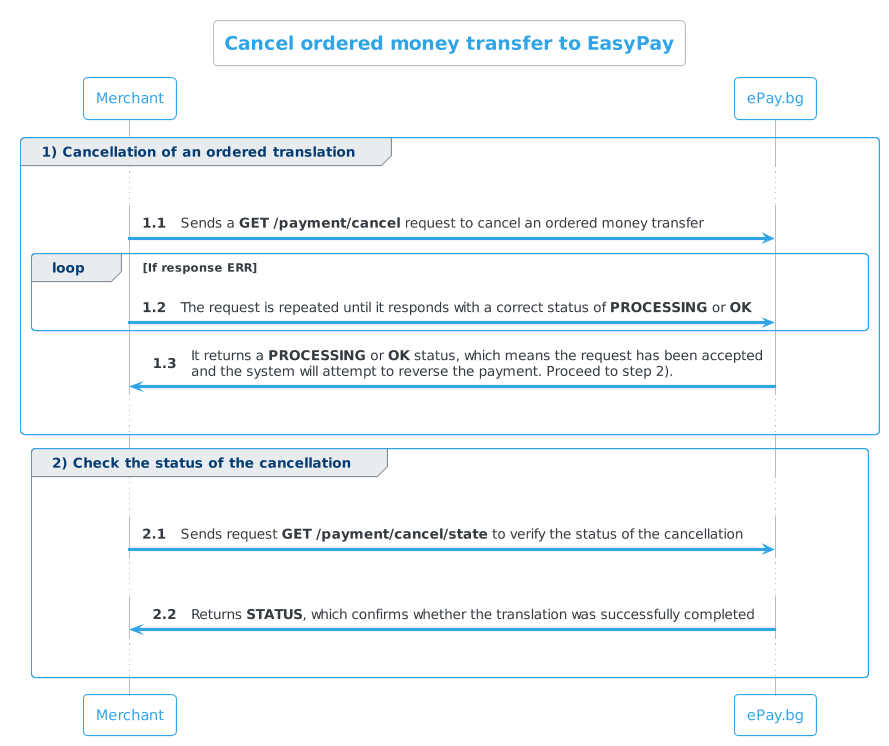
GET /payment/cancel¶¶
Request to cancel an ordered money transfer. The request does NOT answer whether it was reversed successfully, only that it will attempt a reversal. To find out if the process was successful, you need to send a /payment/cancel/state request (cancel status check).
The cancellation request is sent with ENCODED and CHECKSUM parameters:
| Parameter | Description | Optionality |
|---|---|---|
| ENCODED | Base64-encoded (RFC 3548) payment request, EOL=" " | Mandatory |
| CHECKSUM | Checksum on ENCODED generated as HMAC with SHA-1 algorithm and merchant SECRET |
Mandatory |
Parameters in ENCODED
| Parameter | Type | Description | Optionality |
|---|---|---|---|
| MIN | int | Customer Identification Number (CIN) | Mandatory |
| INVOICE | string | Invoice number; unique to merchant | Mandatory |
| AMOUNT | float | Valid amount > 0.01 (eg: 22, 22.8, 22.80) | Mandatory |
| REV_ID | int | Arbitrary unique value serving as identifier | Mandatory |
Responses
OKPROCESSINGERR
STATUS=OK
STATUS=PROCESSING
STATUS=ERR
ERR=error message
Until when do I have to repeat the request?
- Receiving a correct
PROCESSING/OKstatus means that the request has been accepted and the system will try to reverse the payment. - Receiving an
ERRstatus means that there is a problem with the request and it was not accepted by the system, making it necessary to repeat it again.
The request must be repeated until you receive a PROCESSING or OK response.
GET /payment/cancel/state¶¶
The request to check the cancellation status is sent with ENCODED and CHECKSUM parameters
| Parameter | Description | Optionality |
|---|---|---|
| ENCODED | Base64-encoded (RFC 3548) payment request, EOL=" " | Mandatory |
| CHECKSUM | Checksum on ENCODED generated as HMAC with SHA-1 algorithm and merchant SECRET |
Mandatory |
Parameters in ENCODED
| Parameter | Type | Description | Optionality |
|---|---|---|---|
| MIN | int | Customer Identification Number (CIN) | Mandatory |
| INVOICE | string | Invoice number; unique to merchant | Mandatory |
| AMOUNT | float | Valid amount > 0.01 (eg: 22, 22.8, 22.80) | Mandatory |
| REV_ID | int | Arbitrary unique value serving as identifier | Mandatory |
Responses
OKPROCESSINGDENIEDERR
STATUS=OK
STATUS=PROCESSING
STATUS=DENIED
STATUS=ERR
ERR=error message
Important
If a reversal request has already been sent once that was successful and the transfer was reversed, and then a new reversal request is sent for the same transfer, you will get DENIED on the status check.
Possible scenarios¶¶
- On a request to reverse a transfer already paid in a production environment, you will get
PROCESSING/OKand then on checking the result of the reversal you will getDENIED.
Cancellation of payments¶¶
Cancellation of payments is automatic. When concluding the contract, a specific period is specified in which the transfers, which were ordered from the merchant's micro-account and have not been paid, are automatically reversed by our system and the funds are returned to the micro-account.
Info
In this case, the system does not send notifications when the transfer is canceled and the funds are returned.
Regardless of the submitted request expiration period, any successfully ordered transfer is ready for checkout until it is canceled.
The automatic cancellation periods are:
- 7 days
- 14 days
- 30 days
Demo environment¶¶
To simulate requests in the test environment, you need to send an email to
Application Support - msupport@datamax.bg.
WEB API - Money Send via ePay.bg
https://kb.epay.bg/en/web/moneysend_epay/
Payment of a money transfer from a merchant to a customer via ePay.bg¶¶
Process description¶¶
- The merchant prepares a packet that it sends to a given URL as an HTTP GET request.
- Upon submission of a correct request, in the same HTTP session, ePay.bg will return to the merchant "System code for the payment made at ePay.bg".
Each registered merchant in the ePay.bg system has
- Alphanumeric secret word of length 64 (
secret) - Customer Identification Number (
CIN)
The merchant can find them in his https://epay.bg/ profile without being able to change them.
Communication scheme¶¶
Production environment¶¶
| Method | URL |
|---|---|
| GET | https://www.epay.bg/send/send.cgi |
Demo environment¶¶
| Method | URL |
|---|---|
| GET | https://demo.epay.bg/send/send.cgi |
Request for money transfer via ePay.bg¶¶
| Parameter | Description | Optionality |
|---|---|---|
| ENCODED | Base64-encoded (RFC 3548) payment request, EOL=" " | Mandatory |
| CHECKSUM | Checksum on ENCODED generated as HMAC with SHA-1 algorithm and merchant SECRET word |
Mandatory |
Parameters in ENCODED
| Parameter | Type | Description | Optionality |
|---|---|---|---|
| MIN | int | Merchant Customer Identification Number (CIN) | Mandatory |
| MEMAIL | string | Email of the merchant in the system | Mandatory |
| CIN | int | Recipient's Customer Identification Number (CIN) | Mandatory |
| CEMAIL | string | Recipient's email in the system | Mandatory |
| INVOICE | string | Invoice number; unique to merchant | Mandatory |
| AMOUNT | float | Valid amount > 0.01 (eg: 22, 22.8, 22.80) | Mandatory |
| CURRENCY | string | Accepted currencies are BGN, USD or EUR; if not supplied defaults to BGN |
Optional |
| DESCR | string | Transfer description up to 100 characters | Optional |
| ENCODING | encoding | encoding of DESCR |
Optional |
Important
A request with a given INVOICE can enter the system only once.
It is mandatory to submit data about the recipient in the request
The request must contain Personal Identification Number and/or number of a valid Personal Identification Document of the recipient.
If a personal document is submitted, the date of issue is also required.
Example code for making the request
PerlPHP
1 2 3 4 5 6 7 |
{ # Encoding the request $ENCODED = encode_base64('DATA', ''); # '' for EOL (def. is "\n") # Generate checksum $CHECKSUM = hmac_hex($ENCODED, $secret, \&sha1); } |
1 2 3 4 5 6 7 8 |
{ # Encoding the request $ENCODED = base64_encode('DATA'); # Generate checksum $CHECKSUM = hmac('sha1', $ENCODED, $secret); # hmac function code can be seen in demo.php } |
Response
OKERR
SYS_CODE=1234567890 (digits only, up to 64 in length)
The generated code is a signal to the merchant that the transfer was successfully ordered.
ERR=Error description
Retrying the request will not result in another transfer being ordered
No response or one with an empty value should not be a flag that the request to generate a transfer was not or was successful.
The merchant must repeat the request with the same data until receiving a response according to specification (SYS_CODE=123 or ERR=Error Description). Any repetition of a request with the same data will result in the same system code, meaning that repeating the request will not result in another transfer being ordered.
Errors¶¶
No valid recipient client was found¶¶
If a transfer is made by two identifiers at the same time, but one of them is not valid, it will return an error: ERR=EMETHOD: No valid recipient client found!
Example scenarios:
- the email is valid, but the CIN is not
- The CIN is valid, but the email is not
- the email is valid and the CIN is valid, but they are associated with different accounts
One Touch API - Getting Started
https://kb.epay.bg/en/onetouch/ot_pre/
Getting Started¶¶
Description¶¶
ePay.bg One Touch is an interface for communication with ePay.bg servers.
Each registered application in ePay.bg receives:
- secret key (
SECRET) - a unique identifier (
APPID) that you send with each request to our servers
The application enables:
- making payments from the client's bank cards to the merchant's account opened at ePay.bg
- availability checks for payment instruments (bank cards, ePay.bg accounts)
Your customers can make payments via the ePay system in the following ways:
- No user profile in ePay.bg
- From your user profile in ePay.bg
- The customer authorizes the connection between the commercial application and his ePay.bg profile
- The customer specifies a payment account and card with which to make the payment. Users of ePay.bg have an ePay account (Microaccount), as well as the ability to add and use bank credit/debit accounts and cards
- Payments can be made via an account at https://epay.bg/ or ePay.bg mobile application
Register the application¶¶
At this stage, your business needs and the functionality of the application are specified.
1. Liaison with the sales department¶¶
After filling out the form "Request to register as a merchant" form, the Commercial Department of ePay.bg will contact you, to register your application.
2. Defining the Reply address¶¶
Address of your page to which we send statuses of processed requests.
3. You get APPID + SECRET¶¶
Communication with ePay.bg servers¶¶
Communication with the servers of ePay.bg is carried out using the JSON REST API.
Entry points for testing purposes¶¶
| System | Address | Description |
|---|---|---|
| API_BASE | https://demo.epay.bg/xdev/api | Primary communication address |
| API_BASE_WEB | https://demo.epay.bg/xdev/mobile | It is used in the TOKEN generation process |
Upon successful request, you receive a response containing:
1 2 3 4 |
{ "status": "OK" /*and data as requested*/ } |
In the case of a failed request, you receive:
1 2 3 4 5 |
{ "status": "ERR", "err": "SOME_ERROR_CODE", "errm": "A message to display to the user" } |
Tokenization¶¶

We use a form of tokenization hosted by us, through which users securely register their cards.
Concepts¶¶
| Payment Instruments | Payment cards (bank, credit, debit) and accounts |
| Microaccount | A payment instrument that is discovered and supported by EasyPay, via ePay.bg site. Can be used to pay and receive transfers |
| Communication Interface | An electronic circuit designed to a standard that allows one machine to communicate with another machine |
| Tokenization | Data protection mechanism. Implemented to protect financial statements, credit/debit card numbers, personal data, and other confidential information |
One Touch API
https://kb.epay.bg/en/onetouch/onetouch/
ePay One Touch API¶¶
Before you continue:
- You must have contacted our Commercial Department
- You must have received an
APPID
Generate user Token¶¶
A unique user token is required to execute the requests.
Its generation requires the user to enter their payment card number (bank, credit, debit) on the tokenization page hosted at ePay.bg.
Info
Users of https://epay.bg/ have a wider range of possibilities that can be performed by the application and need to authorize it by logging in with a username and password on the tokenization page.
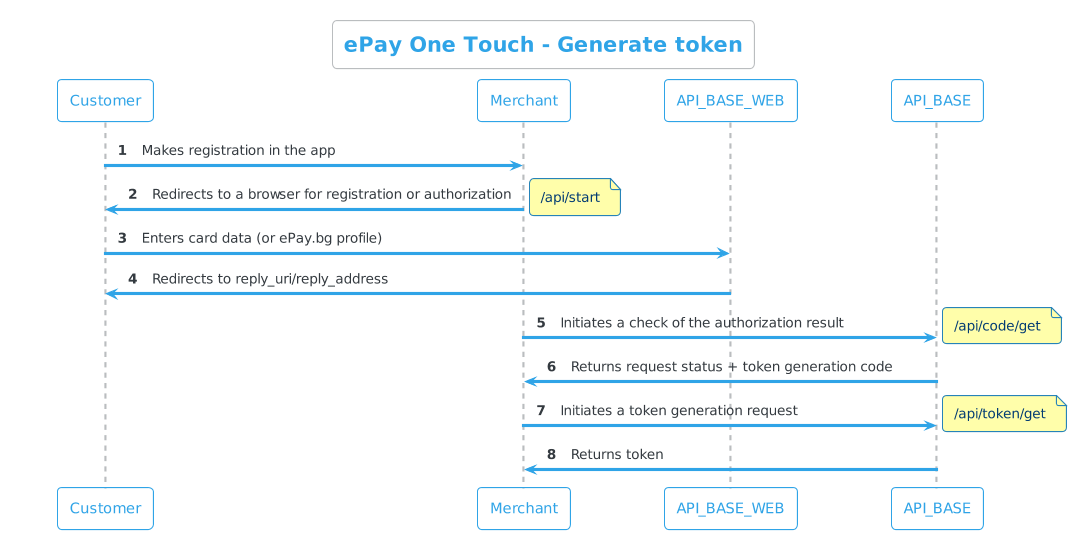
The sequence for generating a user token is as follows:
| Step | Request |
|---|---|
| 1. The user is redirected to a browser for registration or authorization | GET API_BASE_WEB/api/start |
| 2. Checking the result of the authorization | GET API_BASE_WEB/api/code/get |
| 3. Actual receipt of token | GET API_BASE_WEB/api/token/get |
GET /api/start¶¶
| Method | System |
|---|---|
| GET | API_BASE_WEB |
Redirects the user to ePay.bg hosted authorization page and entered the card data to generate a token issuance key. Users of ePay.bg can use their accounts for registration.
| Parameter | Type | Description | Optionality |
|---|---|---|---|
| APPID | string | Unique Application ID | Mandatory |
| DEVICEID | string | Unique ID of the device. Vendor ID on iOS or ANDROID_ID on Android. If the application is WEB, you can use email or username. | Mandatory |
| KEY | int | A unique key against which the result of the query is checked | Mandatory |
| UTYPE | int | When not passed as a parameter, there is no restriction on the user type. UTYPE=1 - Limits the application to work only with users registered in ePay.bg UTYPE=2 - Limits the application to work only with a payment card (credit, debit, bank) |
Optional |
| DEVICE_NAME | string | Device Name | Optional |
| BRAND | string | Device brand | Optional |
| OS | string | Device Operating System | Optional |
| MODEL | string | Device Model | Optional |
| OS_VERSION | float | Operating system version | Optional |
| PHONE | int | User's phone number | Optional |
Important
DEVICEID & KEY combination must be unique.
It is recommended to also send device data to the user, for more convenient permission management later.
Request
https://demo.epay.bg/xdev/mobile/api/start?APPID=appid&DEVICEID=deviceid&KEY=uniq_key&UTYPE=2&DEVICE_NAME=myphone&BRAND=iPhone&OS=iOS&MODEL=iPhone5s&OS_VERSION=8.0&PHONE=1
Response
Depending on the authorization result, the user will be redirected to links to open your mobile application or lead to your WEB page.
The response is the same for test and production environments.
For mobile appFor web app
| Address | Description |
|---|---|
| REPLY_URI/authok | On success |
| REPLY_URI/authagain | On failure |
More information about REPLY_URI in mobile applications
If the address you set for reply contains :// you will recieve authok|authagain=1
If the address does not contain :// - we will return reply_uri://authok|authagain ?msg=....
| Address | Description |
|---|---|
| REPLY_ADDRESS/?ret=authok | On success |
| REPLY_ADDRESS/?ret=authagain | On failure |
GET /api/code/get¶¶
| Method | System |
|---|---|
| GET | API_BASE |
The authorization output is checked and a token issuance code is obtained.
Minimum/Maximum time to execute /code/get request
- You don't need to wait for the user to return to the application/page to submit the request.
- In the absence of a response containing
codewithin the 15-minute session, you must run the request for an additional 15 minutes - 30 minutes in total. In cases where there is a delay in processing by the financial institutions, this way you will ensure that your users will not be charged 1 BGN without being able to get the token generation code. - It is a good practice to spread requests to 20-30 seconds.
| Parameter | Type | Description | Optionality |
|---|---|---|---|
| APPID | string | Unique Application ID | Mandatory |
| DEVICEID | string | Unique device identifier | Mandatory |
| KEY | int | Unique key from previous request /api/start | Mandatory |
Request
https://demo.epay.bg/xdev/api/api/code/get?APPID=appid&DEVICEID=deviceid&KEY=uniq_key
Response
Successful authorizationAuthorization failed
1 2 3 4 |
{ "status": "OK", "code": "token_code" } |
| Parameter | Type | Description |
|---|---|---|
| status | string | Request status |
| code | string | Used in request to get token |
1 2 3 4 5 |
{ "status":"ERR", "err":"SOME_ERR", "errm":"error to show to user" } |
The authorization failed. It may be rejected or incomplete.
GET /api/token/get¶¶
| Method | System |
|---|---|
| GET | API_BASE |
Actual receipt of token.
| Parameter | Type | Description | Optionality |
|---|---|---|---|
| APPID | string | Unique Application ID | Mandatory |
| DEVICEID | string | Unique device identifier | Mandatory |
| CODE | string | Parameter code from request response /api/code/get |
Mandatory |
Request
https://demo.epay.bg/xdev/api/api/token/get?APPID=appid&DEVICEID=deviceid&CODE=token_code
Response
1 2 3 4 5 6 7 8 |
{ "status": "OK", "TOKEN": "token_string", "EXPIRES": 1720188520, "KIN": "client uniq number", "USERNAME": "client username", "REALNAME": "client real name" } |
| Parameter | Type | Description |
|---|---|---|
| status | string | Request status |
| TOKEN | string | Unique access user ID |
| EXPIRES | int unixtime | Token validity |
| KIN | string | Customer identification number (for ePay.bg users) |
| USERNAME | string | Username (for ePay.bg users) |
| REALNAME | string | User names (for ePay.bg users) |
Token Validity
The token is valid until explicitly invalidated by submitting a request to the One Touch API.
All subsequent requests must contain APPID, DEVICEID, and TOKEN.
Deactivate Token¶¶
What happens after token deactivation
After this request, the token is disabled and the user will not be able to use the application.
GET /api/token/invalidate¶¶
| Method | System |
|---|---|
| GET | API_BASE |
| Parameter | Type | Description | Optionality |
|---|---|---|---|
| APPID | string | Unique Application ID | Mandatory |
| DEVICEID | string | Unique device identifier | Mandatory |
| TOKEN | string | Unique access user ID | Mandatory |
Request
https://demo.epay.bg/xdev/api/api/token/invalidate?APPID=appid&DEVICEID=deviceid&TOKEN=token
Successful deactivationFailed to deactivate
1 2 3 |
{ "status": "OK" } |
1 2 3 4 5 |
{ "status":"ERR", "errm":"You need to authorize your device again", "err":"EBADTEN" } |
One Touch API¶¶
Checksum (Optional)¶¶
If you wish to use a checksum to validate the request, you can use the APPCHECK parameter.
The checksum is generated as follows:
hmac_sha1_hex (request_data, SECRET)
request_data represents newline (/n) concatenated lines containing concatenated PARAM_NAME and param_value sorted in ascending order by PARAM_NAME.
If the request requires a token
The user's CIN with a concatenated newline (/n) must be added to request_data.
User Information¶¶
GET /user/info¶¶
| Method | System |
|---|---|
| GET | API_BASE |
Shows general information about a user
| Parameter | Type | Description | Optionality |
|---|---|---|---|
| APPID | string | Unique Application ID | Mandatory |
| DEVICEID | string | Unique device identifier | Mandatory |
| TOKEN | string | Unique identifier of the access user | Mandatory |
| PINS | int 0|1 |
To obtain information about the user's payment instruments PINS = 1 |
Optional |
Request
https://demo.epay.bg/xdev/api/user/info?APPID=appid&DEVICEID=deviceid&TOKEN=token&PINS=1
Response
SuccessfulFailed
1 2 3 4 5 6 7 8 9 10 11 12 13 14 15 16 17 18 19 20 21 22 23 24 25 26 27 28 29 30 31 |
{ "status": "OK", "userinfo": { "GSM":"", "PIC": "user picture address", "REAL_NAME": "the name with which it is registered in ePay.bg", "ID": "user ID", "KIN": "Customer Identification Number", "EMAIL": "user@email.com" }, "payment_instruments":[ { "ID": "identifier of the payment instrument, submitted when paying with it", "VERIFIED": 1, "BALANCE": "21015", "PIC": "", "TYPE": 2, "NAME": "MicroAccount", "EXPIRES": "" }, { "ID": "UsYGw8-pTlZU4DJOAYT914hLVte6sRaUsdWXuK1wELs", "VERIFIED": 1, "BALANCE": "", "PIC": "", "TYPE": 1, "NAME": "what the user named their card", "EXPIRES": "03/2017" }, ], } |
1 2 3 4 5 |
{ "status": "ERR", "err": "EBADT", "errm": "Login failed, check your code or contact support." } |
Description of response parameters
userinfo
| Parameter | Type | Description |
|---|---|---|
| GSM | string | Mobile number of the recipient with which he is registered in ePay.bg |
| PIC | string | User photo URL |
| REAL_NAME | string | The name with which the user is registered in ePay.bg |
| ID | string | User ID |
| KIN | string | Client ID |
| string | User email |
payment_instruments
| Parameter | Type | Description |
|---|---|---|
| ID | string | Payment instrument identifier (submitted when paying with it) |
| VERIFIED | int 0|1 |
Is the payment instrument verified 0 - no 1 - yes |
| BALANCE | string | Amount in stotinki For bank cards, it is called separately for each of them by the user, because usually banks charge for this operation |
| PIC | string | Image by type of payment instrument Microaccount, VISA, or MasterCard |
| TYPE | int 1|2 |
Type of payment instrument 1 - Bank card 2 - Microaccount |
| NAME | string | Name of the payment instrument (entered by the user) |
| EXPIRES | string MM/YYYY |
Payment instrument expiration date Microaccounts do not have an expiration date |
GET /user/info/pins¶¶
| Method | System |
|---|---|
| GET | API_BASE |
Information about payment instruments
Request
https://demo.epay.bg/xdev/api/user/info/pins?APPID=appid&DEVICEID=deviceid&TOKEN=token
Response
Successful
1 2 3 4 5 6 7 8 9 10 11 12 13 14 15 16 17 18 19 20 21 22 23 24 25 26 27 28 29 30 31 32 33 34 35 36 37 38 39 40 41 |
{ "status":"OK", "payment_instruments":[ { "ID":"UsYGw8-pTlZU4DJOAYT919QVd1EXm2KQ8iD9-2Mr-dQ", "VERIFIED":1, "BALANCE":"9808668", "PIC":"", "TYPE":2, "NAME":"MicroAccount", "EXPIRES":"", "CARD_TYPE":"", "CARD_TYPE_COUNTRY":"", "CARD_TYPE_DESCR":"", }, { "ID":"UsYGw8-pTlZU4DJOAYT91xPUP8YqpocJScram3nKxVs", "VERIFIED":1, "BALANCE":"", "PIC":"", "TYPE":1, "NAME":"PIB Maestro", "EXPIRES":"12/2015", "CARD_TYPE":"6", "CARD_TYPE_COUNTRY":"", "CARD_TYPE_DESCR":"" }, { "ID":"UsYGw8-pTlZU4DJOAYT914wtfCccfrIbeMWwUDFeuOM", "VERIFIED":1, "BALANCE":"", "PIC":"", "TYPE":1, "NAME":"CCB MC 3", "EXPIRES":"12/2015", "CARD_TYPE":"5", "CARD_TYPE_COUNTRY":"", "CARD_TYPE_DESCR":"MasterCard" }, ] } |
Description of response parameters
payment_instruments
| Parameter | Type | Description |
|---|---|---|
| ID | string | Identifier of the payment instrument (submitted when paying with it) |
| VERIFIED | int 0|1 |
Is the payment instrument verified 0 - no 1 - yes |
| BALANCE | string | Amount in stotinki |
| PIC | string | Image by type of payment instrument Microaccount, VISA, or MasterCard |
| TYPE | int 1|2 |
Type of payment instrument 1 - Bank card 2 - Microaccount |
| NAME | string | Name of the payment instrument (entered by the user) |
| EXPIRES | string MM/YYYY |
Payment instrument expiration date Microaccounts do not have an expiration date |
| CARD_TYPE | string | The first digit of the card number if it is a bank card |
| CARD_TYPE_COUNTRY | string | Card issuing country |
| CARD_TYPE_DESCR | string | Information about the payment instrument |
GET /user/info/pins/balance¶¶
| Method | System |
|---|---|
| GET | API_BASE |
Information on the availability of payment instruments
Microaccount¶¶
Microaccount availability check is done with one request.
| Parameter | Type | Description | Optionality |
|---|---|---|---|
| APPID | string | Unique Application ID | Mandatory |
| DEVICEID | string | Unique Device ID | Mandatory |
| TOKEN | string | Unique access user identifier | Mandatory |
| PINS | string | Microaccount ID | Mandatory |
Request
GET API_BASE/user/info/pins/balance?PINS=microaccount_id&APPID=appid&DEVICEID=deviceid&TOKEN=token
Response
Successful
1 2 3 4 5 6 7 8 9 10 11 12 13 |
{ "status":"OK", "payment_instruments":[ { "STATUS":"OK", "ID":"UsYGw8-pTlZU4DJOAYT919QVd1EXm2KQ8iD9-2Mr-dQ", "BALANCE":"9808668", "TYPE":2, "NAME":"MicroAccount", "EXPIRES":"" } ] } |
Description of response parameters
| Parameter | Type | Description |
|---|---|---|
| STATUS | string | Request status |
| ID | string | Payment instrument identifier (submitted when paying with it) |
| BALANCE | string | Amount in stotinki Microaccount balance is returned immediately |
| TYPE | int 1|2 |
Type of payment instrument1 - Bank card 2 - Microaccount |
| NAME | string | Name of the payment instrument (entered by the user) |
| EXPIRES | string | It's always blank text because microaccounts don't have an expiration date |
Payment request¶¶
This request is used to order a transfer from the registered card or from the user's account to the merchant's account.
Payment can be made both with a payment instrument already added to the application and with a new card on the mobile page of ePay.bg.
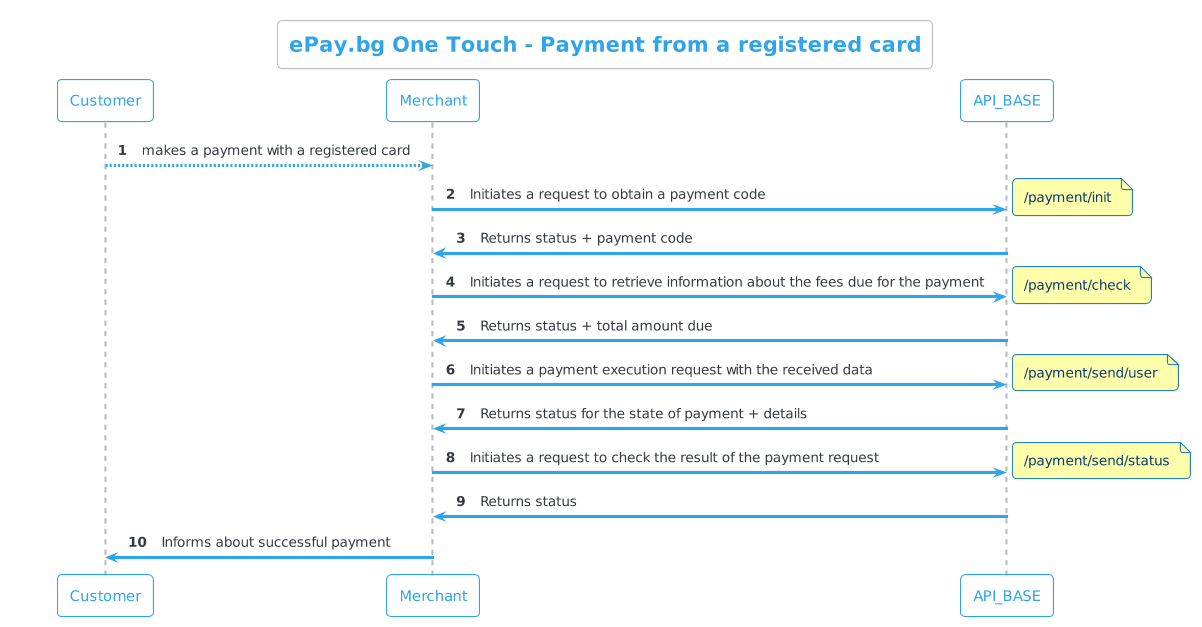
Payment is made in four steps:
| Step | Request |
|---|---|
| 1. Get a payment code | POST API_BASE/payment/init |
| 2. Checking the parameters | POST API_BASE/payment/check |
| 3. Payment Request | POST API_BASE/payment/send/user |
| 4. Check the result | POST API_BASE/payment/send/status |
POST /payment/init¶¶
| Method | System |
|---|---|
| POST | API_BASE |
Used to get an identifier for the payment ID.
The identifier obtained from this request is used for the following:
- check fees
- the payment
- payment status check
Query parameters
| Parameter | Type | Description | Optionality |
|---|---|---|---|
| APPID | string | Unique Application ID | Mandatory |
| DEVICEID | string | Unique Device ID | Mandatory |
| TOKEN | string | Unique Access User ID | Mandatory |
| TYPE | string | send |
Mandatory |
| EXP | int UnixTime | When adding an EXP=Unix Time parameter, the validity time of the returned ID |
Optional |
Request
https://demo.epay.bg/xdev/api/payment/init?APPID=appid&DEVICEID=deviceid&TOKEN=token&TYPE=send
Response
Successful
1 2 3 4 5 6 |
{ "payment": { "ID":"UsYGw8-pTlZU4DJOAYT91_v-l30SMjADFA6AYPWYbJI" }, "status":"OK" } |
Description of response parameters
payment
| Parameter | Type | Description |
|---|---|---|
| ID | string | Payment ID (used in subsequent requests) |
POST /payment/check¶¶
| Method | System |
|---|---|
| POST | API_BASE |
It is used to obtain information about the fees due for the payment.
If the payment amount changes or the user selects a different payment instrument, the request must be executed to obtain the current charges for the payment.
Query parameters
| Parameter | Type | Description | Optionality |
|---|---|---|---|
| ID | string | Payment ID (from /payment/init) | Mandatory |
| TYPE | string | send |
Mandatory |
| AMOUNT | int | The amount in stotinki | Mandatory |
| RCPT | string | Recipient's CIN | Mandatory |
| RCPT_TYPE | string | It's always KIN |
Mandatory |
| DESCRIPTION | string | Payment description | Mandatory |
| REASON | string | Described reason for the transfer | Mandatory |
| PINS | string | Identifier of a payment instrument through which the payment is to be made. If none is submitted, the fees for all | Mandatory |
| SHOW | List | What the payee should see. For sender can be one or more of the: - GSM;KIN;EMAIL;NAME separated by comma , - KIN - Customer number in ePay.bg (by default) - GSM - Mobile number of the recipient with which it is registered in ePay.bg - EMAIL - E-mail of the recipient with which it is registered in ePay.bg |
Mandatory |
Request
https://demo.epay.bg/xdev/api/payment/check?APPID=appid&DEVICEID=deviceid&TOKEN=token&TYPE=send&ID=id&AMOUNT=amount&RCPT=merchant_kin&RCPT_TYPE=KIN&DESCRIPTION=descr&REASON=reason&PINS=microid_pin&SHOW=KIN
Response
Successful
1 2 3 4 5 6 7 8 9 10 11 12 13 14 15 16 17 18 19 20 |
{ "payment":{ "ID":"UsYGw8-pTlZU4DJOAYT91_v-l30SMjADFA6AYPWYbJI", "PAYMENT_INSTRUMENTS":[ { "ID":"UsYGw8-pTlZU4DJOAYT91xPUP8YqpocJScram3nKxVs", "NAME":"PIB Maestro", "TAX":1, "TOTAL":35, "STATUS":"OK" } ], "AMOUNT":34, "DATA":{ "RCPT_TYPE":"KIN", "RCPT":"3894711478" } }, "status":"OK" } |
Description of response parameters
``payment''
| Parameter | Type | Description |
|---|---|---|
| ID | string | Payment ID (from /payment/init) |
| PAYMENT_INSTRUMENTS | Array | Array with the payment instruments |
| AMOUNT | int | Amount in stotinki |
| DATA | List | RCPT_TYPE = "KIN", RCPT = "Recipient's KIN" |
PAYMENT_INSTRUMENTS
| Parameter | Type | Description |
|---|---|---|
| ID | string | Payment instrument identifier |
| NAME | string | Merchant Name |
| TAX | int | Payment fee |
| TOTAL | int | Payment amount |
| STATUS | string | Status |
DATA
| Parameter | Type | Description |
|---|---|---|
| RCPT_TYPE | string | It's always KIN |
| RCPT | string | Recipient's CIN |
POST /payment/send/user¶¶
| Method | System |
|---|---|
| POST | API_BASE |
Fulfillment of the payment from the customer to the merchant
Query parameters
| Parameter | Type | Description | Optionality |
|---|---|---|---|
| ID | string | Identifier of the payment instrument (submitted when paying with it) | Mandatory |
| AMOUNT | int | Amount in stotinki | Mandatory |
| RCPT | string | CIN of Recipient | Mandatory |
| RCPT_TYPE | string | It's always KIN |
Mandatory |
| DESCRIPTION | string | Payment Description | Mandatory |
| REASON | string | Described reason for transfer | Mandatory |
| PINS | string | Identifier of the payment instrument through which the payment is to be made. If none is submitted, fees are returned for all | Mandatory |
| SHOW | List | What the payee should see. For sender can be one or more of the: - GSM;KIN;EMAIL;NAME separated by comma , - KIN - Customer number in ePay.bg (default) - GSM - Mobile number of the recipient with which it is registered in ePay.bg - EMAIL - Email of the recipient with which it is registered in ePay.bg |
Mandatory |
Request
https://demo.epay.bg/xdev/api/payment/send/user?APPID=appid&DEVICEID=deviceid&TOKEN=token&TYPE=send&ID=payment_id&AMOUNT=amount&RCPT=merchant_kin&RCPT_TYPE=KIN&DESCRIPTION=descr&REASON=reason&PINS=pins_id&SHOW=KIN
Response
1 2 3 4 5 6 7 8 9 10 11 12 13 14 15 16 17 18 19 20 21 22 23 24 |
{ "payment": { "ID":"UsYGw8-pTlZU4DJOAYT91_v-l30SMjADFA6AYPWYbJI", "AMOUNT":34, "TAX":1, "TOTAL":35, "RCPT":"3894711478", "RCPT_TYPE":"KIN", "DESCRIPTION":"", "REASON":"", "STATE":2, "STATE.TEXT":"Processing", "PINS":"UsYGw8-pTlZU4DJOAYT918PwRo4yHpe9i2EP4MXhQYVswVNAZdgJUljcrW22_Z9D9frQUAwOWHst\nN924CNqh3A", "SHOW":"6051143866", "SHOW.KIN":1, "SHOW.NAME":0, "SHOW.GSM":0, "SHOW.EMAIL":0, "SHOW.PIC":0, "NO":"", }, "status":"OK" } |
Description of response parameters
payment
| Parameter | Type | Description |
|---|---|---|
| ID | string | Payment ID (from /payment/init) |
| AMOUNT | int | The amount of the transfer in stotinki |
| TAX | int | The fee for the transfer is in cents |
| TOTAL | int | AMOUNT + TAX in stotinki |
| RCPT | string | Customer Identification Number (CIN) of the recipient of the transfer |
| RCPT_TYPE | string | It's always KIN |
| DESCRIPTION | string | Description of the payment |
| REASON | string | Described reason for transfer |
| STATE | int | Payment result 2|3|4 2 - Processing 3 - Payment successful 4 - Payment failed |
| STATE.TEXT | string | An error that can be displayed to the user |
| PINS | string | Identifier of the payment instrument through which the payment is to be made. If none is submitted, the fees for all |
| SHOW | string | Displays the result depending on the setting of SHOW.X |
| SHOW.KIN | int | User's CIN |
| SHOW.NAME | int | User names (for ePay.bg users) |
| SHOW.GSM | int | Mobile number of the user (for ePay.bg users) |
| SHOW.EMAIL | int | User email (for ePay.bg users) |
| SHOW.PIC | int | User photo (for ePay.bg users) |
| NO | string | Payment system code |
POST /payment/send/status¶¶
| Method | System |
|---|---|
| POST | API_BASE |
Checking the result of the payment request
Query parameters
| Parameter | Type | Description | Optionality |
|---|---|---|---|
| ID | string | Identifier of the payment instrument (submitted when paying with it) | Mandatory |
| AMOUNT | int | Amount in stotinki | Mandatory |
| RCPT | string | CIN of Recipient | Mandatory |
| RCPT_TYPE | string | It's always KIN |
Mandatory |
| DESCRIPTION | string | Payment Description | Mandatory |
| REASON | string | Described reason for transfer | Mandatory |
| PINS | string | Identifier of the payment instrument through which the payment is to be made. If none is submitted, fees are returned for all | Mandatory |
| SHOW | List | What the payee should see. For sender can be one or more of the: - GSM;KIN;EMAIL;NAME separated by comma , - KIN - Customer number in ePay.bg (default) - GSM - Mobile number of the recipient with which it is registered in ePay.bg - EMAIL - Email of the recipient with which it is registered in ePay.bg |
Mandatory |
Request
https://demo.epay.bg/xdev/api/payment/send/status?APPID=appid&DEVICEID=deviceid&TOKEN=token&TYPE=send&ID=payment_id&AMOUNT=amount&RCPT=merchant_kin&RCPT_TYPE=KIN&DESCRIPTION=descr&REASON=reason&PINS=pins_id&SHOW=KIN
Response
Saved cardUnsaved card
1 2 3 4 5 6 7 8 9 10 11 12 13 14 15 16 17 18 19 20 21 22 23 |
{ "status":"OK", "payment":{ "ID":"UsYGw8-pTlZU4DJOAYT91_v-l30SMjADFA6AYPWYbJI", "AMOUNT":34, "TAX":1, "TOTAL":35, "RCPT":"3894711478", "RCPT_TYPE":"KIN", "DESCRIPTION":"", "REASON":"", "STATE":4, "STATE.TEXT": "Payment made", "PINS":"UsYGw8-pTlZU4DJOAYT918PwRo4yHpe9i2EP4MXhQYVswVNAZdgJUljcrW22_Z9D9frQUAwOWHst\nN924CNqh3A", "SHOW":"6051143866", "SHOW.KIN":"6051143866", "SHOW.NAME":"", "SHOW.GSM":"", "SHOW.EMAIL":"", "NO":"2000000000032229", }, "savecard": 1 } |
1 2 3 4 5 6 7 8 9 10 11 12 13 14 15 16 17 18 19 20 21 22 23 24 25 26 27 28 |
{ "status": "OK", "payment": { "ID":"UsYGw8-pTlZU4DJOAYT915SmHpAR07b9BTHwjlZMrIM", "AMOUNT":50, "TAX":102, "TOTAL":152, "RCPT":"4470411058", "RCPT_TYPE":"KIN", "DESCRIPTION":"DESCR", "REASON":"reason", "STATE":3, "STATE.TEXT":"Payment made", "SHOW":"4303137865", "SHOW.KIN":"4303137865", "SHOW.NAME":"", "SHOW.GSM":"", "SHOW.EMAIL":"", "NO":"2000000000032229" }, "paid_with": { "CARD_TYPE_COUNTRY":"", "CARD_TYPE_DESCR":"Visa", "CARD_TYPE":"4", "TYPE": 1 }, "savecard": 0 } |
Description of response parameters
payment
| Parameter | Type | Description |
|---|---|---|
| ID | string | Payment ID (from /payment/init) |
| AMOUNT | int | The amount of the transfer in stotinki |
| TAX | int | The fee for the transfer is in cents |
| TOTAL | int | AMOUNT + TAX in stotinki |
| RCPT | string | Customer Identification Number (CIN) of the recipient of the transfer |
| RCPT_TYPE | string | It's always CIN |
| DESCRIPTION | string | Description of the payment |
| REASON | string | Described reason for transfer |
| STATE | int | Payment result 2|3|4 2 - Processing 3 - Payment successful 4 - Payment failed |
| STATE.TEXT | string | An error that can be displayed to the user |
| PINS | string | Identifier of the payment instrument through which the payment is to be made. If none is submitted, the fees for all |
| SHOW | string | Displays the result depending on the setting of SHOW.X |
| SHOW.KIN | int | User's CIN |
| SHOW.NAME | int | User names (for ePay.bg users) |
| SHOW.GSM | int | Mobile number of the user (for ePay.bg users) |
| SHOW.EMAIL | int | User email (for ePay.bg users) |
| NO | string | Payment system code |
paid_with
Description of payment card when not saved "savecard": 0
| Parameter | Type | Description |
|---|---|---|
| CARD_TYPE_COUNTRY | string | Issuing country of the card |
| CARD_TYPE_DESCR | string | Information about the payment instrument |
| CARD_TYPE | string | The first digit of the card number if it is a bank card |
| TYPE | int | 1 (bank card) |
One Touch No Reg API
https://kb.epay.bg/en/onetouch/onetouch_no_reg/
One Touch No Reg API
Before you continue:
- You must have contacted our Commercial Department
- You must have received
APPID&SECRET
Payment by an unregistered user¶¶
Upon payment by a user without registration, a token is generated, the validity of which is determined by the option to save the card for future payments savecard = 0|1.
With savecard = 0, the token is only valid for the current payment
With savecard = 1 the token is valid for all future payments
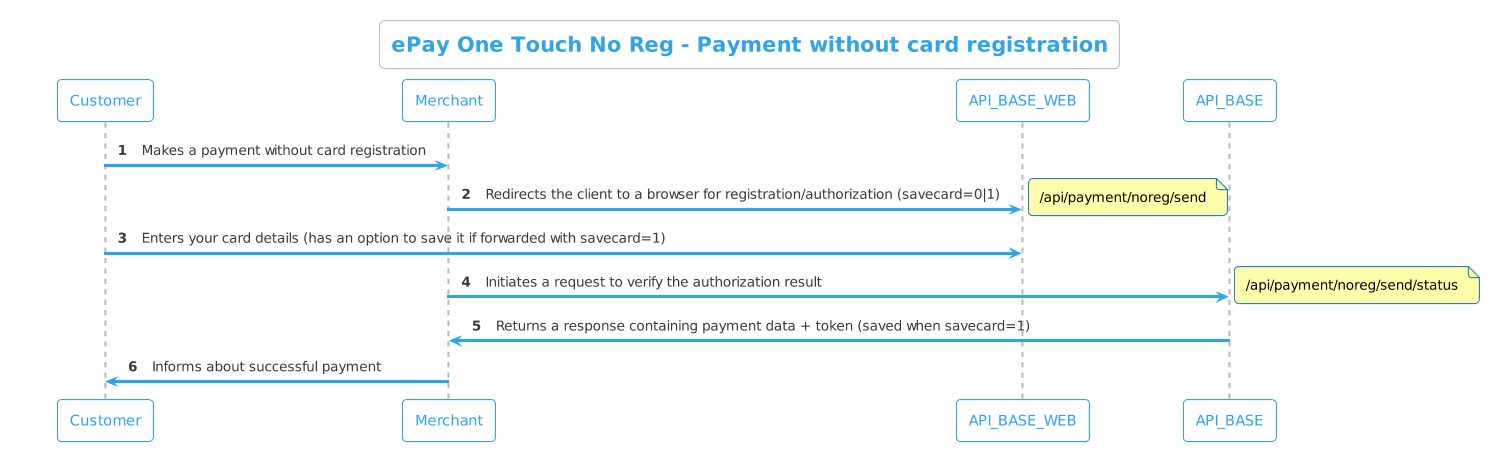
Generate checksum¶¶
Payment requests from a non-registered user require a Hexadecimal HMAC SHA-1 CHECKSUM
| Parameter | Description |
|---|---|
| request_data | The parameters and their values in the request, sorted in ascending order by parameter name, concatenated with \n (newline) |
| SECRET | A unique key that you receive from ePay.bg when registering an application |
Sample query parameters
1 2 3 4 5 6 7 8 9 10 11 |
{ "AMOUNT":"10", "APPID":"2143960160650364377823089976443473298565779337965372776022890068", "DESCRIPTION":"some descr", "DEVICEID":"1231234", "ID":"124345678", "RCPT":"8897458022", "RCPT_TYPE":"KIN", "REASON":"reason", "SAVECARD":1 } |
Example of request_data
request_data="AMOUNT10\nAPPID2143960160650364377823089976443473298565779337965372776022890068\nDESCRIPTIONsome descr\nDEVICEID1231234\nID124345678\nRCPT8897458022\nREASON\nREASON_TYPE"
Checksum generation example
1 2 3 4 5 6 7 8 9 10 11 12 13 14 15 16 17 18 19 20 21 22 23 24 25 26 27 |
my $amount = '10'; my $appid = '2143960160650364377823089976443473298565779337965372776022890068'; my $descr = 'some descr'; my $deviceid = '1231234'; my $id = '124345678'; my $rcpt = '8897458022'; my $rcpt_type = 'KIN'; my $reason = 'reason'; my $savecard = '1'; my $secret = '012345678909876543210'; my $data = <<DATA; AMOUNT$amount APPID$appid DESCRIPTION$descr DEVICEID$deviceid ID$id RCPT$rcpt RCPT_TYPE$rcpt_type REASON$reason SAVECARD$savecard DATA my my $CHECKSUM = hmac_hex($data, $secret, \&sha1); #Checksum: 98a395b01ec69d049528d8971b8546aaa4adac16 |
Encoding result
Encoding request_data with parameter SECRET="012345678909876543210"
Result:
CHECKSUM = "98a395b01ec69d049528d8971b8546aaa4adac16"
GET /api/payment/noreg/send¶¶
| Method | System |
|---|---|
| POST | API_BASE_WEB |
The user enters card details and chooses whether to keep it for future payments.
This generates a TOKEN user ID after which the user can make a payment.
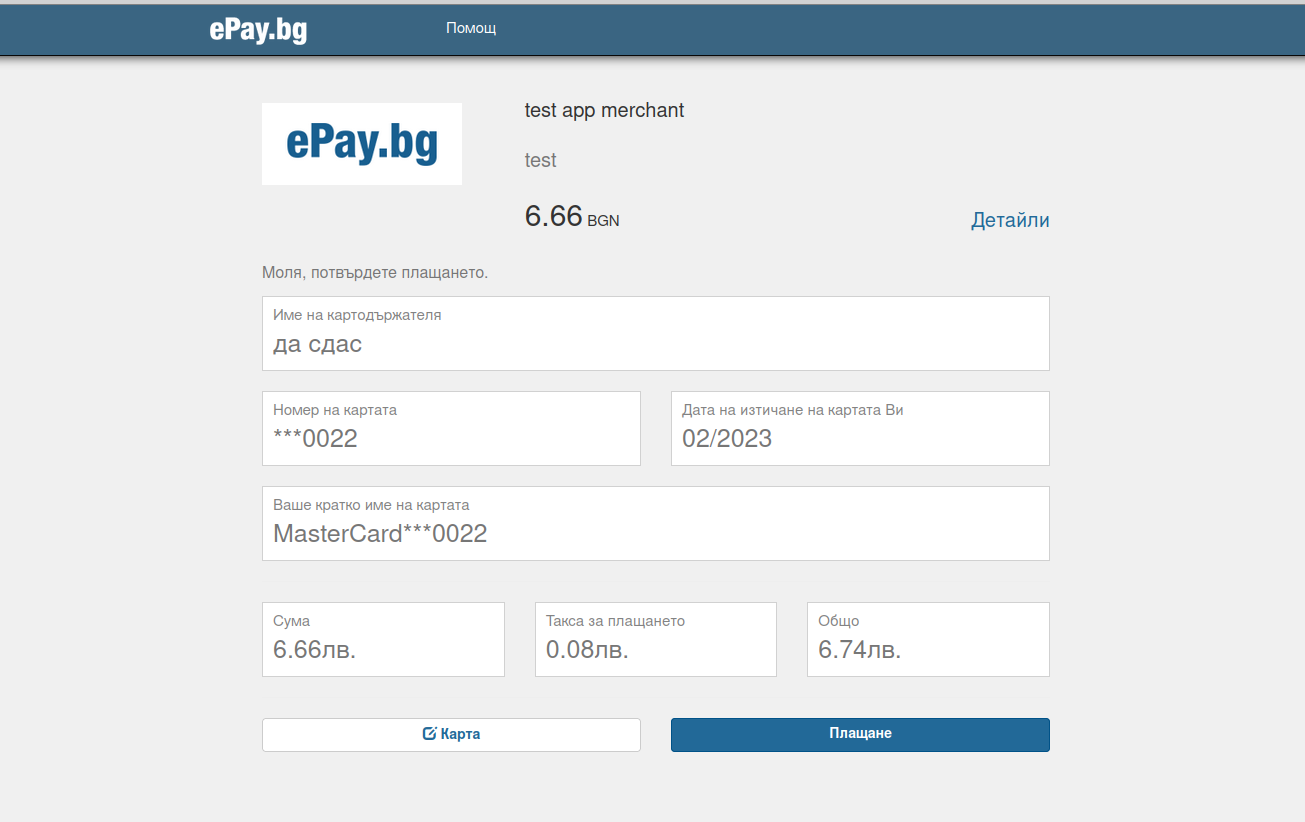
Token validity for unsaved card
With savecard = 0, the token is only valid for the current payment.
Query parameters
| Parameter | Type | Description | Optionality |
|---|---|---|---|
| AMOUNT | int | Payment amount in stotinki | Mandatory |
| APPID | string | Application ID | Mandatory |
| DESCRIPTION | string | Transfer Description | Mandatory |
| DEVICEID | string | Device ID | Mandatory |
| ID | string | Unique key by which to subsequently search for the query result | Mandatory |
| RCPT | string | Recipient's CIN | Mandatory |
| RCPT_TYPE | string | It is always KIN |
Mandatory |
| REASON | string | Described reason for transfer | Mandatory |
| CHECKSUM | string | Hexadecimal HMAC SHA-1 is a checksum verifying that the request came from you | Mandatory |
| SAVECARD | int 0|1 |
Option to save the card for future payments SAVECARD = 1 |
Optional |
Sample request
Example without saving cardExample with autosave card
API_BASE_WEB/api/payment/noreg/send?APPID=2143960160650364377823089976443473298565779337965372776022890068&DEVICEID=1231234&ID=124345678&AMOUNT=10&RCPT=8897458022&RCPT_TYPE=KIN&DESCRIPTION=some descr&REASON=reason&checksum=93bb9753b17205f94b184bc5a94f55b3d1d2afca
API_BASE_WEB/api/payment/noreg/send?APPID=2143960160650364377823089976443473298565779337965372776022890068&DEVICEID=1231234&ID=124345678&AMOUNT=10&RCPT=8897458022&RCPT_TYPE=KIN&DESCRIPTION=some descr&REASON=reason&SAVECARD=1&checksum=98a395b01ec69d049528d8971b8546aaa4adac16
After entering card details, the customer is redirected to REPLY_ADDRESS.
GET /api/payment/noreg/send/status¶¶
| Method | System |
|---|---|
| GET | API_BASE |
Verification of payment by an unregistered user
| Parameter | Type | Description | Optionality |
|---|---|---|---|
| APPID | string | Unique application identifier | Mandatory |
| DEVICEID | string | Unique device identifier | Mandatory |
| ID | string | Unique key by which to subsequently search for the query result | Mandatory |
| RCPT_TYPE | string | It is always KIN |
Mandatory |
| RCPT | string | Recipient's CIN | Mandatory |
Sample request
https://demo.epay.bg/xdev/api/api/payment/noreg/send/status?AMOUNT=666&APPID=6609898197243081281733444125044765054179316360618564706359682755&CHECKSUM=24f946e2d30ea5c184c788539cf8f06fe996cc18&DESCRIPTION=test&DEVICEID=TestTestov123&ID=TestTestov123&RCPT=2945322142&RCPT_TYPE=KIN&REASON=test
Response on successful payment¶¶
With savecard=1, a TOKEN is returned which can be used for future payments. The ID of the payment instrument is also returned, which must be submitted in the PINS parameter for subsequent payments.
Successful payment with a saved cardSuccessful payment without saving card
1 2 3 4 5 6 7 8 9 10 11 12 13 14 15 16 17 18 19 20 21 22 23 24 25 26 27 28 29 |
{ "payment": { "REASON":"reason for transfer", "DESCRIPTION":"transfer description", "AMOUNT":10, "TAX":100, "TOTAL":110, "RCPT_TYPE":"KIN", "RCPT":"8897458022", "PAYER_KIN":"5112074184", "STATE":3, "STATE.TEXT":"Payment made", "TOKEN": "99823906809141864859059099131376", "NO":"2000000000032229", }, "payment_instrument": { "ID": "UsYGw8-pTlZU4DJOAYT911cDTSmYoCcPYIAaLZp-1FQ", "CARD_REF": "c8fb30bdaed9d9721b4ac215251333900548cca18575ae1f017566c12f8ee626", "NAME": "Visa***1111", "CARD_TYPE": "4", "TYPE": 1, "CARD_TYPE_DESCR": "Visa", "EXPIRES": "04/2020", "VERIFIED": 0, "CARD_TYPE_COUNTRY": "BG" }, "savecard": 1, "status":"OK" } |
1 2 3 4 5 6 7 8 9 10 11 12 13 14 15 16 17 18 19 20 21 22 23 24 |
{ "payment":{ "AMOUNT":10, "TAX":100, "TOTAL":110, "REASON":"reason for transfer", "DESCRIPTION":"transfer description", "RCPT":"8897458022", "RCPT_TYPE":"KIN", "PAYER_KIN":"5112074184", "STATE":3, "STATE.TEXT":"Payment made", "TOKEN": "99823906809141864859059099131376", "NO":"2000000000032229", }, "paid_with": { "CARD_TYPE": "4", "TYPE": 1, "CARD_TYPE_DESCR": "Visa", "CARD_TYPE_COUNTRY": "" }, "savecard": 0, "status":"OK" } |
Description of response parameters
payment
| Parameter | Type | Description |
|---|---|---|
| AMOUNT | int | Payment amount in stotinki |
| TAX | int | Payment fee in stotinki |
| TOTAL | int | AMOUNT + TAX in stotinki |
| REASON | string | Additional payment description |
| DESCRIPTION | string | Payment description |
| RCPT | string | Recipient's CIN |
| RCPT_TYPE | string | It's always KIN |
| PAYER_KIN | string | CIN of the payer |
| STATE | int | Payment result 2|3|4 2 - Processing 3 - Payment successful 4 - Payment failed |
| STATE.TEXT | string | An error that can be displayed to the user |
| TOKEN | string | A unique user ID |
| NO | string | Payment system code |
payment_instrument
Contains savecard=1 when the user has saved the payment instrument during checkout.
| Parameter | Type | Description |
|---|---|---|
| ID | int | Card key |
| NAME | string | Card name |
| CARD_TYPE | string | The first digit of the card number |
| CARD_TYPE_DESCR | string | Payment instrument information |
| TYPE | int 0|1 |
TYPE = 1 (bank card) |
| EXPIRES | string MM/YYYY |
Card validity date |
| VERIFIED | int 0|1 |
Is the card confirmed 0 - no 1 - yes |
| CARD_TYPE_COUNTRY | string | Card issuing country |
paid_with
Contains savecard=0 when the user has NOT saved the payment instrument during checkout.
| Parameter | Type | Description |
|---|---|---|
| CARD_TYPE_COUNTRY | string | Card issuing country |
| CARD_TYPE_DESCR | string | Information about the payment instrument |
| CARD_TYPE | string | The first digit of the card number if it is a bank card |
| TYPE | int 0|1 |
TYPE = 1 (bank card) |
Response to failed payment¶¶
Payment failedRequest not paidRequest ExpiredRequest Error
1 2 3 4 5 6 7 8 9 10 11 12 13 14 15 16 17 18 19 20 21 22 23 24 |
{ "payment": { "REASON": "reasondominos", "DESCRIPTION": "descrdominos", "AMOUNT": 140, "TAX": 0, "TOTAL": 140, "RCPT_TYPE": "KIN", "RCPT": "4303137865", "PAYER_KIN": "3099545641", "STATE": 4, "STATE.TEXT": "Payment failed (Temporarily unable to complete. Please try again later. (1))", "TOKEN": "00000000000000000480783218379645", "NO": "2000000000039033", }, "paid_with": { "CARD_TYPE_DESCR": "Visa", "TYPE": 1, "CARD_TYPE": "4", "CARD_TYPE_COUNTRY": "BG" }, "savecard": 0, "status": "OK" } |
1 2 3 4 |
{ "status":"OK", "msg":"NOT PAID", } |
This status shows the current status of the request, the customer may not have paid the request yet.
1 2 3 4 |
{ "status":"OK", "msg":"EXPIRED", } |
Returns when the request is not paid within 15 minutes
1 2 3 4 5 |
{ "status": "ERR", "err": "NO_DATA", "errm": "Request failed. Please contact support" } |
Description of response parameters
| Parameter | Type | Description |
|---|---|---|
| status | string | Status |
| msg | string | Error message |
| err | string | Error type |
| errm | string | Description of the error |
Billing API - Getting Started
https://kb.epay.bg/en/billing/billing/
ePay Billing - periodic payments¶¶
Description¶¶
You can receive regular payments from your customers with bank cards and cash. You don't need to have a website, it's enough to submit information about your clients' obligations.
Customers can pay:
- at EasyPay checkouts
- via ePay.bg
- via online banking of most banks
It is suitable for utility companies, cable operators, internet providers, house managers, kindergartens, and merchants who have a billing system.
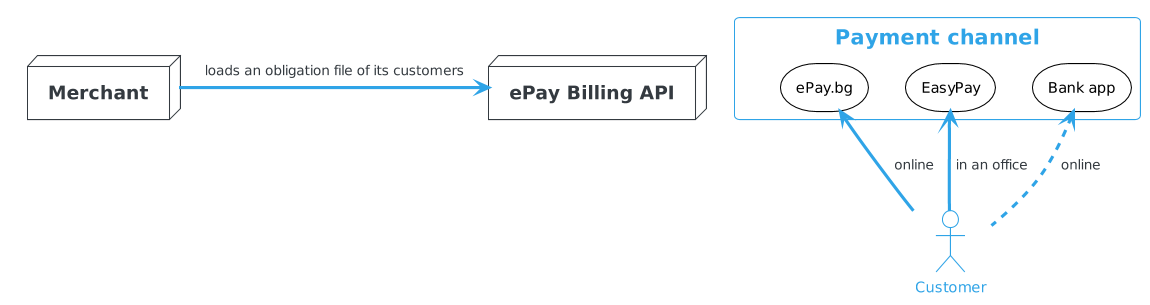
Advantages¶¶
- We offer a professional integrated solution for online payments.
- Your customers can pay in the most convenient way for them - with a bank card via the Internet, via mobile phone, at an ATM, or in cash.
- Automatic response from ePay.bg about the status of each payment.
- You are present on the page with registered merchants.
Billing - File Upload/Download
https://kb.epay.bg/en/billing/system/fileupload/
Load obligations and download reports of payments made through the trading system¶¶
URL - https://mrcs.easypay.bg/
Merchant registration¶¶
- Register at the address from the "New registration" option
- Press the "Registration" button
- Select the "New Merchant Registration" option
- Fill in all the data and press "View"
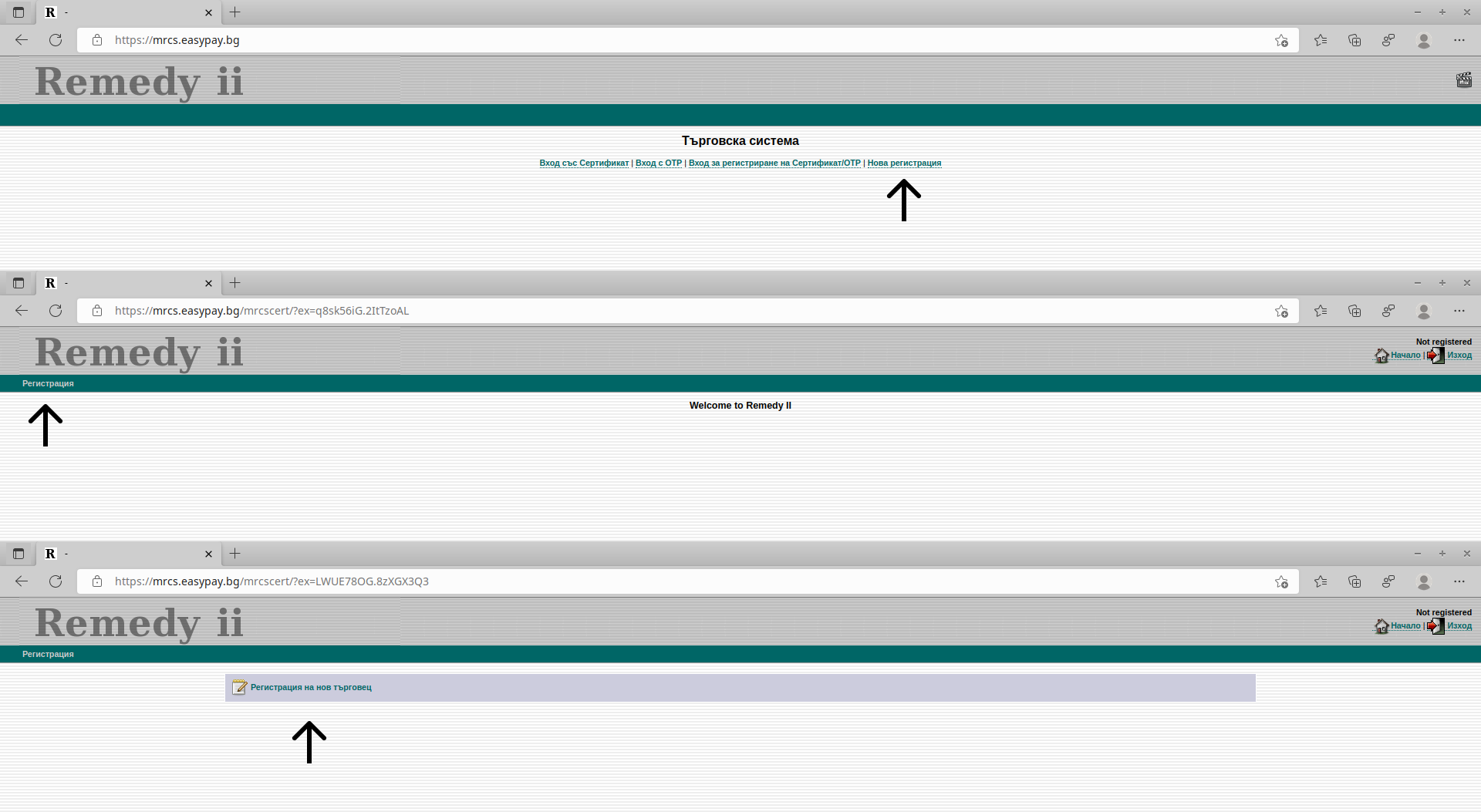
Registration of OTP Token¶¶
After you have registered at the address, it is necessary to add an additional authentication when entering the system - an OTP token.
Install an OTP authentication app on your smartphone:
- ePay.bg (dpass)
- Google Authenticator
- others
The following steps are performed at https://mrcs.easypay.bg/.
- Select "Certificate/OTP Login"
- Enter your username and password, and in the "Certificates/OTP" menu, select "Register OTP - dpass, Google Authenticator"
- You will see your user on the screen, continue with the "View" button, and in the next step enter your password.
- Scan the generated QR code with dpass (the mobile application of ePay.bg), Google Authenticator, or another mobile application that is installed on your phone. your OTP token is already registered.
Next time you log in to the system to upload files, and download reports, or inquiries, use "Login with OTP" from the home page. In addition to the username and password, a temporary code generated by the mobile application in the smartphone is also entered.
Upload and load file with obligations¶¶
Upload a file¶¶
Enter your username, password and token, then press "Login".
- From the menu bar select "Files"
- Select the "Upload" folder
- Then select the file to upload from your file system
- Enter a description (optional)
Loading file¶¶
- After successfully uploading the file, select the menu "Accounts"
- Press "Load Accounts" and select the file you wish to load. If you have not specified a session in the file, you can do so at this stage in the field provided.
When loading a file into the system for the first time, use the current date and time in YYYYMMDDHHmmss format for the session.
Example:
20220609103222
Year: 2022
June
Day: 09
Hour: 10
Minutes: 32
Seconds: 22
For each subsequent load, the session from the last processed report must be used. You can see the reports in the folder "Files" --> "Reports".
You can see the status of the loaded files in the menu "Accounts" --> "Loaded accounts". You can see your most recently uploaded files at the top.
Download reference file¶¶
Enter your username, password, and temporary code, then press "Login".
- From the menu bar select "Files"
- Select the "Reports" folder to get the file you want

As a next step, continue with Technical Requirements where you will get acquainted with all the peculiarities of submitting files.
Billing - Technical Requirements
https://kb.epay.bg/en/billing/system/merchant-requirements/
Technical requirements for connection to the EasyPay/ePay.bg payment system¶¶
Peculiarities when submitting files¶¶
The merchant prepares and provides the Operator with a file in text format and .txt or .csv extension. The content carries information about the subscriber number and the amount due. Encoding should be Windows CP-1251.
File Submission
The submitted file can be archived (zip, rar, or tar.gz), but the contents of the archive must be in .csv or .txt format.
Access to the system¶¶
URL - https://mrcs.easypay.bg/
The operator provides access to a specialized WEB interface for information management by the merchant - uploading files with customer obligations and receiving a report on paid bills. Access to the WEB interface is achieved with a username, password, and software certificate.
To familiarize yourself with the functionalities of the system click here.
Payments from customers¶¶
The identifier by which a customer will be able to pay his debts is a subscriber number. The subscriber number and the name of the merchant are indicated at the EasyPay checkout. When paying online via ePay.bg, the merchant and the customer's corresponding subscriber number are added to his registration.
File structure¶¶
Mandatory information¶¶
- Subscriber number
- Amount of the obligation
In case of more than one obligation, the amount is charged by the merchant, and a general obligation is submitted to the Operator.
Important
There should be only one entry (line) for each subscriber in the file submitted by the merchant. If a subscriber number is present on more than one line, it is considered a duplicate.
All rows with duplicate numbers will be ignored by the system.
Session (session):¶¶
The session is a date, accurate to the second, and its presence is mandatory.
The syntax is:
session=20151109114043 (YYYYMMDDhhmmss)
The rule for the session is that the number that appears in the last report issued by the Operator that the Trader processed must be used. The merchant hereby confirms that it has processed all reports issued at the time of loading.
Ways to bet on a session:
- To appear in the liability file submitted by the Merchant (see sample file).
- To be added when loading the file in the trading system, in the corresponding field.
More information¶¶
- Name of the subscriber
- Address
- Payment period
- Obligation type
- Any other information that the merchant needs require
Separators¶¶
A symbol may be used for information column separators at the merchant's discretion.
Eligible charactersInvalid characters
| Symbol | Description (name) |
|---|---|
| : | Colon |
| ; | Semicolon |
| ⇆ | Tab |
| Symbol | Description (name) |
|---|---|
| . | Point |
| , | Comma |
| ␣ | Space |
| " | A quotation mark |
An example file with obligations from the merchant, in which Pipeline | is used as a delimiter
ANUM|NAME|ADDRESS|MONTH|YEAR|AMOUNT
202779050|Marin Marinov|city Sofia, gh. Mladost 1, bl. 388, app. 5|05|2015|430.25
131503520|Stefan Petrov Todorov|ul. Angel Kanchev N17, entrance A|06|2015|155.67
182703523|Ralitsa Borisova|6 Lyulin, bl. 513 entrance Ah, app. 24|10|2014|170.01
session=20151109114043
The arrangement of the columns of information is not regulated, but it must be identical every time, according to the template agreed upon between the Merchant and the Operator.
Required columns¶¶
| Parameter | Description | Addition |
|---|---|---|
| ANUM | Subscriber Number | Only numbers are accepted |
| AMOUNT | Payment amount | Period or comma allowed for decimal separator155.67 or 155,67 |
Optional columns¶¶
Everything other than subscriber number and amount is optional, but columns bearing name and address information are additional clarification for the payer.
Info
Although these are optional, the availability of additional information is recommended.
The statement of payments made, generated by the Operator (Report)¶¶
The operator will generate a report file every day after 11:20 am. even when there are no payments. The period it covers is from 11:20 am. on the current day, until 11:20 am. of the previous one (24 hours). It is the merchant's duty to process the data from all generated reports before loading a new file with obligations.
Sample report generated by the Operator
202779050:20151109151215:430.25:449297449297:700020
131503520:20151109164216:155.67:523619523619:700021
131503523:20151109164216:170.01:523617523617:700011
session: 20151110112034: 3 records: total: 755.93
The column structure is as follows: 1:2:3:4:5
| Index | Description |
|---|---|
| 1 | Subscriber number |
| 2 | Date and time of payment, accurate to the second YYYYMMDDhhmmss |
| 3 | Amount |
| 4 | Reference in EasyPay/ePay.bg |
| 5 | Payment source |
On the last line: session/number of payments on file/total amount
Payment Source¶¶
It always consists of six digits. Transactions with sources 70002x and 7001xx are considered cash payments via EasyPay, all others can be considered as electronic payments via ePay.bg. Following this logic, we can look at the sources of the sample report:
- 700020 and 700021 belong to EasyPay - payment in cash at the cash register.
- 700011 belongs to electronic payment via ePay.bg.
Frequency of file submission from the merchant to the Operator¶¶
The period during which the merchant will submit a file is at his discretion - once a day, weekly, monthly, or whatever time interval is needed. The essential thing here is to observe the rule for processing all reports generated by the Operator until the moment of loading.
Frequency of suspension of the merchant for payment¶¶
The merchant may choose to suspend payment from customers at a regular, pre-specified interval. This is done in order to facilitate the processing of generated reports on payments made, before loading a new file. The period and duration are chosen by the merchant. By default, this option is not active.
Extraordinary addition of subscribers to a file by the merchant¶¶
In the event that there are new subscribers in the Trader's database during a time when it is not convenient to load a new file, the system offers an option to add only the new data. This is done with the keyword "mrcsappend", which is placed in the file name.
Important
This functionality is only for adding new subscribers! It does not serve to renew the obligations of current customers.
Sample scenario¶¶
The merchant uploaded a file on 03/01/2015, the next scheduled upload will be on 04/01/2015. In the middle of the month, two new clients appear in the Trader's base. Instead of waiting until 01.04, the merchant will prepare a file with an identical structure to the regulated one, but only the new two subscribers will appear as data.
Regular file¶¶
The standard file uploaded on 03/01/2015 by the merchant is named "epay_obligations0103.csv"
1001|Ivan Madzharov|Sofia, gh. Ovcha Cupel 3|50|Yoga course
1002|Petya Mihailova|ul. Ivan Vazov 17, Office Building 1|113.50|Yoga course
1003|Andrei Vassilev| Borovo, bl. 40A|17|Yoga course
session=20150301114043
An extraordinary file of new subscribers¶¶
These are the new two subscribers that the merchant wishes to add. The structure is identical to that of the regular files, except for the session - it is not submitted. The file name is "epay_obligations1503.mrcsappend.csv" Through the keyword "mrcsappend" the system understands that the merchant only wants to add new entries, not to refresh the file entirely.
1004|Kremena Nikolova|Lyulin 3, bl 212, apartment 61|50|Yoga course
1005 | Magdalena Dimitrova | Lyulin 3, bl 1|25|Yoga course
Addendum for payment of an obligation on invoices¶¶
Mandatory information¶¶
- Subscriber number
- Amount of the obligation
- Invoice number
In case of more than one obligation of one customer, each amount is submitted on a new line, in combination with the subscriber number and a unique invoice number (uniqueness is monitored only in the specific file).
More information¶¶
- Name of the subscriber
- Address
- Payment period
- Obligation type
- Invoice number
- Any other information that the merchant needs require
Important
For each subscriber on file, with more than one obligation, there must always be a unique combination of subscriber number and invoice. If a combination is present on more than one line, it is considered a duplicate.
All duplicate rows will be ignored by the system.
Sample file with obligations from the merchant, in which the semicolon ';' is used as a separator
ANUM;NAME;ADDRESS;INVOICE;PHONE;AMOUNT;TYPE
112233; Zahari Stoyanov; town Pernik, village Byala, bl. 8, apartment 1;0101;0888888888;10.50;Garbage fee
434343; Ivan Petrov; gk. Vitosha, Naroden Buditel 8, Office 1; 0101; 0888888888; 12.99; Garbage fee
434343; Ivan Petrov; gk. Vitosha, Naroden Buditel 8, Office 1; 0102; 0888888888; 12.99; Garbage fee
434343; Ivan Petrov; gk. Vitosha, Naroden Buditel 8, Office 1; 0103; 0888888888; 16.99; Garbage fee
100000; Klara Valkova; Zapaden park, bl. 13 entrance D, app. 6;2211;0888888888;0.99;Rental fee
100000; Klara Valkova; Zapaden park, bl. 13 entrance D, app. 6;2316;0888888888;0.99;Rental fee
100000; Klara Valkova; Zapaden park, bl. 13 entrance D, app. 6;2411;0888888888;0.99;Rental fee
100000; Klara Valkova; Zapaden park, bl. 13 entrance D, app. 6;2515;0888888888;0.99;Rental fee
100000; Klara Valkova; Zapaden park, bl. 13 entrance D, app. 6;2612;0888888888;0.99;Rental fee
session=20151201134042
Required columns¶¶
| Parameter | Description | Addition |
|---|---|---|
| ANUM | Subscriber Number | Only numbers are accepted |
| AMOUNT | Amount to pay | Period or comma allowed for decimal separator12.99 or 12,99 |
| INVOICE | Invoice Number | Numbers are accepted, no duplication of one subscriber in one file is allowed |
Sample report generated by the Operator¶¶
112233:0101:20151204121549:10.50:404487404487:700020
434343:0101:20151104122001:12.99:404489404489:700020
434343:0102:20151104122001:12.99:404490404490:700020
100000:2211:20151104122001:0.99:404491404491:700010
session: 20151205112012: 4 records: total: 37.47
The column structure is as follows: 1:2:3:4:5:6
| Index | Description |
|---|---|
| 1 | Subscriber number |
| 2 | Invoice |
| 3 | Date and time of payment, accurate to the second (YYYYMMDDhhmmss) |
| 4 | Amount |
| 5 | Reference in EasyPay/ePay.bg |
| 6 | Payment source |
On the last line:
session/number of payments on file/total amount
Billing API - Protocol
https://kb.epay.bg/en/billing/protocol/
Exchange batch messages via HTTP GET¶¶
Before you continue
Use of HTTPS and TLS 1.2 is mandatory
Types of methods¶¶
| Method | Sample Request URL | Description |
|---|---|---|
| GET /pay/init | https://example.com/pay/init | Payment check |
| GET /pay/confirm | https://example.com/pay/confirm | Payment notification |
Note
All sample requests will be encrypted with SECRET: 3EA1ABD845C3D684
Types of parameters¶¶
| Parameter | Data Type | Description | Addition |
|---|---|---|---|
| IDN | varchar(64)n | Customer ID | Provided by merchant |
| MERCHANTID | varchar(8)n | Merchant ID | Provided by the Operator |
| INVOICE | varchar(64)ans | Invoice number | In case of split payment of liabilities |
| INVOICES | varchar(490)ans | Array of invoice numbers | On split payment of liabilities |
| SHORTDESC | varchar(40)Ans | Short Obligation Description | One line encoded in UTF-8 |
| LONGDESC | varchar(4000)Ans | Command Detail | More than one line encoded in UTF-8 |
| AMOUNT | int | Amount in stotinki | Output parameter on validation |
| VALIDTO | varchar(8)n | Date due | YYYYMMDD |
| STATUS | varchar(3)n | Commitment Status Code | Result or error code |
| TID | varchar(26)n | Transaction ID | DATE(14)n + STAN(6)n + AID(6)n |
| DATE | varchar(14)n | Query execution date | YYYYMMDDhhmmss |
| TOTAL | int | Amount in stotinki | Input parameter at checkout |
| TYPE | varchar(7)a | CHECK, BILLING, PARTIAL, DEPOSIT |
Depending on the request type |
| CHECKSUM | HEX | On incoming data sorted by key | IDNxxxx\nMERCHANTIDxxxx\n |
More information¶¶
LONGDESC:
A detailed description of the obligation. It is desirable to submit relevant information about the client - period of service, type of service, address, name, others. It is entered on a single line, with carriage-encoded \n every 110 characters. May contain the following substitutions:
\teight spaces\$eight dashes\ncarriage return
INVOICE:
Invoices are a private term for protocol, they are not tied to actual legal data. They serve to distinguish accumulated more than one or different obligations of a given customer. Each individual obligation of this customer has a unique invoice.
TID:
A unique identifier for each individual transaction. In case of a problem with a given transaction, it is possible for the Operator to send more than one repetition until receiving a correct response from the merchant. The repetition is always the same. TID is formed by:
DATEDate and time, accurate to the second. The time can be from 00:00:00 to 23:59:59STANService information of the Operator - not processedAIDPayment Source. They are divided into two types - 70002x and 7001xx are cash payments from Izipey.
All other sources can be accepted as ePay.bg electronic channels
CHECKSUM:
hmac_sha1_hex (request_data, SECRET)
request_dataincludes all incoming data, concatenated with NEWLINE (\n) lines containing a parameter and its corresponding value, concatenated. The data is sorted in ascending order.SECRETis provided by the Operator.
TYPE:
The field can contain one of the following values, depending on the request type:
CHECKObligation check only, no payment will followBILLINGWhen checking or paying an obligationPARTIALWhen notification of partial payment of an obligationDEPOSITWhen prepaying a service
List of STATUS codes¶¶
| STATUS | Description | Returnable method |
|---|---|---|
| 00 | OK | pay_init and pay_confirm |
| 13 | Invalid amount (on deposit) | pay_init |
| 14 | Invalid subscriber number (IDN) | pay_init |
| 62 | No Obligation | pay_init |
| 80 | Temporarily unable to execute | pay_init |
| 93 | Invalid checksum (CHECKSUM) | pay_init and pay_confirm |
| 94 | Repeat of already received notification | pay_confirm |
| 96 | General error | pay_init and pay_confirm |
On response other than 00 all parameters except STATUS are ignored.
Only the meaning of the status predefined by the Operator will be visualized to the client. Field information such as LONGDESC and SHORTDESC will be ignored.
More information¶¶
96:
General error. When the Operator has not received a response from the merchant within the stipulated time of 60 seconds, it is also interpreted as 96.
Also, invalid or missing required fields from the output. The Operator will send a repetition of the notification until receiving a correct status from the merchant.
94:
It has the meaning of 00. If the merchant's system accepted the payment request and returned a status of 00, but no response was received in our system - then, as a rule, the source should continue to send the same message until it receives a correct response. When receiving the same message again, the merchant can return 94, which means status 00 - the request has been processed and its repetition can be stopped.
80:
Temporarily Cannot Fulfill - the merchant is temporarily unable to process payments. It is usually returned when the merchant has temporarily stopped payments due to updating the obligations of its customers, or some other feature.
Obligation check¶¶
Serves to check for current obligations of a customer, payment will not follow. If the merchant has developed split payment by invoices, it must return an INVOICES parameter with the relevant data, if there is more than one obligation. When working under general obligation, this parameter is not submitted.
Important
If upon request to receive an obligation with TYPE=BILLING, the merchant has returned STATUS: 00 and an amount greater than 0 in the outgoing data, this is a signal to the Operator that payment can begin and will be processed accordingly. The merchant should be able to process a subsequent payment notification of type pay_confirm. If a payment will not be able to be made, the merchant must also return the STATUS : 96 method or another relevant to the situation to the pay_init method.
GET /pay/init¶¶
Input data
| Parameter | Description | Optional |
|---|---|---|
| IDN | Customer ID | Mandatory |
| MERCHANTID | Merchant ID | Mandatory |
| CHECKSUM | HMAC-SHA-1 HEX of incoming data sorted by key | Mandatory |
| TYPE | May contain CHECK or BILLING |
Mandatory |
| TID | The field does not appear in a request with parameter TYPE=CHECK |
Optional |
Output data
| JSON Object | Description | Optional |
|---|---|---|
| STATUS | On response other than 00, all parameters except STATUS are ignored |
Mandatory |
| IDN | Customer ID | Mandatory |
| AMOUNT | Amount in stotinki. When paying by invoices, their total value is submitted. | Mandatory |
| VALIDTO | Date to which obligation is currently | Mandatory |
| SHORTDESC | Entered on one line. Brief information about the customer - name, address, other information | Mandatory |
| LONGDESC | When splitting by invoices, synthesized information must be submitted for all invoices | Mandatory |
| INVOICES | If the merchant does not allow payment by invoices, do not submit this field | Optional |
Output data of array INVOICES (supplied when payments of individual obligations-invoices are developed)
| Data in INVOICES | Description | Optional |
|---|---|---|
| IDN | Subscriber number and invoice of the specific obligation concatenated with a dot (IDN.INVOICE) |
Mandatory |
| AMOUNT | Amount for the specific invoice | Mandatory |
| VALIDTO | Date to which the specific invoice is currently | Mandatory |
| SHORTDESC | Short description for the specific invoice | Mandatory |
| LONGDESC | Full description for the specific invoice | Mandatory |
Each individual invoice is fed into an array of INVOICES objects with the parameters described above. The invoice is formed from the customer's subscriber number, concatenated with a dot, and the invoice number (IDN.INVOICE) of the specific obligation.
Good practice
It is recommended that each invoice have its own description of the service or period it is associated with.
Examples¶¶
Request
Check only, payment will not follow:
https://example.com/pay/init?IDN=12345&CHECKSUM=702de02734d25c719c6ccc87526478e851f6271d&MERCHANTID=0000334&TYPE=CHECK
Payment may follow:
https://example.com/pay/init?IDN=12345&CHECKSUM=2736e17a183ed4b6923f7e0395b6c0523fdf0404&TID=20170317121650591535700020&MERCHANTID=0000334&TYPE=BILLING
Response
In case of general obligation:
1 2 3 4 5 6 7 8 9 |
{ "STATUS" : "00", "IDN" : "12345", "SHORTDESC" : "Ivan Ivanov, Internet service", "LONGDESC" : ":customer number: 12345\nNames: Ivan Ivanov\n Internet service 01.03.2017 - 31.03.2017", "AMOUNT" : "16600", "VALIDTO" : "20170317", } |
With two invoices:
1 2 3 4 5 6 7 8 9 10 11 12 13 14 15 16 17 18 19 20 21 22 23 24 25 |
{ "STATUS" : "00", "IDN" : "12345", "SHORTDESC" : "Ivan Ivanov, Internet service", "LONGDESC" : "customer number: 12345\nNames: Ivan Ivanov\n Internet service 01.03.2017 - 30.04.2017", "AMOUNT" : "16600", "VALIDTO" : "20170317", "INVOICES" : [ { "IDN" : "12345.001", "SHORTDESC" : "Business Int. - 100 mbps BGN 78", "AMOUNT" : "7800", "LONGDESC" : "customer number: 12345\nNames: Ivan Ivanov\n Internet service 01.03.2017 - 31.03.2017", "VALIDTO" : "20170331" }, { "IDN" : "12345.002", "SHORTDESC" : "Business Int. - 150 mbps BGN 88", "AMOUNT" : "8800", "LONGDESC" : "customer number: 12345\nNames: Ivan Ivanov\n Internet service 31.03.2017 - 30.04.2017", "VALIDTO" : "20170430"} ] } |
Payment notification¶¶
Serves to notify the merchant of a payment made by the customer. Notification will be received only after a correct response to a pay_init type liability retrieval request that includes a TID field.
When paying under general obligation:
- If the merchant has not developed invoice payment and only submits a general obligation, he will receive incoming data without the
INVOICESfield.
When paying by invoice:
- Upon full repayment of all invoices, the merchant will receive a notification without the
INVOICESparameter. TheTOTALparameter will contain the sum of all invoices submitted by the merchant to pay_init. - When paying a smaller number of invoices submitted by the merchant on pay_init, the Operator will also send an
INVOICESparameter in the notification. Its value is formed by the subscriber number of the customer, concatenated with a dot, and the invoice number of the specific obligation (IDN.INVOICE). For more than one invoice, the values are separated by commas (IDN.INVOICE,IDN.INVOICE,IDN.INVOICE).
For partial payment:
- In this case, the merchant will receive a value of
TYPE=PARTIALand the amount selected by the customer. It is possible that it is less than the one submitted by the merchant on pay_init. The field `INVOICES' does not appear in this notification.
Payment notifications cannot be declined.
The merchant will receive this message at set intervals until it responds with STATUS : 00 or STATUS : 94.
The merchant must be able to handle multiple notification messages. That is, it can receive one notification message several times in a row, or if it is delayed in responding to the first one (over 30 sec), it can receive a second one while processing the first one. In all cases, only one payment message should be reflected, and the rest should be answered with a status of 00 or 94.
GET /pay/confirm¶¶
Input data
| Parameter | Description | Optional |
|---|---|---|
| IDN | Customer ID | Mandatory |
| MERCHANTID | Merchant ID | Mandatory |
| TID | Transaction ID | Mandatory |
| DATE | Request execution date | Mandatory |
| TOTAL | Amount in stotinki | Mandatory |
| TYPE | May contain BILLING or PARTIAL |
Mandatory |
| INVOICES | IDN.INVOICE - for more than one invoice, values are listed with commas |
Optional |
| CHECKSUM | HMAC-SHA-1 HEX of incoming data sorted by key | Mandatory |
Output data
| JSON Object | Description |
|---|---|
| STATUS | All parameters except STATUS and its corresponding predefined value are ignored. |
Important
In the event of a problem occurring when confirming a transaction, the Operator automatically repeats it until receiving a correct response from the merchant. The identifier by which the merchant can understand that this is a repeat and not a new payment is the TID - it will always be the same for each repeat of the particular transaction.
Examples¶¶
Request
Check on full repayment:
https://example.com/pay/confirm?DATE=20170316181226&TYPE=BILLING&MERCHANTID=0000334&IDN=12345&CHECKSUM=823383f09ab489fe172762703f8c047ce4428530&TOTAL=16600&TID=20170317121650509015053
Check when paying an invoice:
https://example.com/pay/confirm?DATE=20170316181226&TYPE=BILLING&MERCHANTID=0000334&IDN=12345&TOTAL=7800&CHECKSUM=06c5786385a673bfcc25a10a6d59722769bca25f&TID=2017031712165050901535&VOICES=5040101535.
Partial repayment check:
https://example.com/pay/confirm?DATE=20170316181226&TYPE=PARTIAL&MERCHANTID=0000334&IDN=12345&CHECKSUM=70514b288b2167b5bcf6324eaddc1a8179cebd57&TOTAL=100&TID=2017031712165059152305700
Response
1 2 3 4 5 |
{ "STATUS" : "00" } |
Note
All parameters except STATUS and its corresponding predefined value are ignored.
Check for deposit¶¶
Used to check whether a deposit transaction (prepayment) can be made for a given customer. The request also contains an amount that the Merchant can validate or not. The amount can also be in predefined denominations.
GET /pay/init¶¶
Input data
| Parameter | Description | Optional |
|---|---|---|
| IDN | Customer ID | Mandatory |
| MERCHANTID | Merchant ID | Mandatory |
| CHECKSUM | HMAC-SHA-1 HEX of incoming data sorted by key | Mandatory |
| TYPE | DEPOSIT |
Mandatory |
| TID | Transaction ID | Mandatory |
| TOTAL | Amount in stotinki | Mandatory |
Output data
| JSON Object | Description | Optional |
|---|---|---|
| STATUS | If the value of STATUS is not 00, all other fields are ignored |
Mandatory |
| SHORTDESC | Short description. Name, Email or Other - Customer Relevant Identifier | Mandatory |
| LONGDESC | Detailed description. Entered on a single line, with carriage-encoded \n every 110 characters |
Mandatory |
Important
If the merchant has returned STATUS : 00 to a deposit verification request, this is a signal to the Operator that payment can start and will be processed accordingly. The merchant should be able to process a subsequent payment notification (pay_confirm method). If payment cannot be made, the merchant must return the STATUS : 96 method or another relevant to the situation to the pay_init method.
Examples¶¶
Request
Deposit Check:
https://example.com/pay/init?IDN=12345&MERCHANTID=0000334&CHECKSUM=123c13322543764d4af33d87a4a8dd0965777ed6&TYPE=DEPOSIT&TID=20170317121650591535700020&TOTAL=2000
Response
1 2 3 4 5 |
{ "STATUS" : "00", "SHORTDESC" : "Customer Name: Ivan Ivanov", "LONGDESC" : "Prepayment of service for 1 month\nCustomer name: Ivan Ivanov" } |
Notification of completed deposit¶¶
Serves to notify the merchant of a deposit payment made.
Payment notifications cannot be declined.
The merchant will receive this message at set intervals until it responds with STATUS : 00 or STATUS : 94.
GET /pay/confirm¶¶
Input data
| Parameter | Description | Optional |
|---|---|---|
| IDN | Customer ID | Mandatory |
| MERCHANTID | Merchant ID | Mandatory |
| TID | Transaction ID | Mandatory |
| DATE | Request execution date | Mandatory |
| CHECKSUM | HMAC-SHA-1 HEX of incoming data sorted by key | Mandatory |
| TYPE | DEPOSIT |
Mandatory |
| TOTAL | Amount in stotinki | Mandatory |
Output data
| JSON Object | Description |
|---|---|
| STATUS | All parameters except STATUS and its corresponding predefined value are ignored. |
Examples¶¶
Request
Deposit payment:
https://example.com/pay/confirm?DATE=20170317121950&IDN=12345&MERCHANTID=0000334&CHECKSUM=123c13322543764d4af33d87a4a8dd0965777ed6&TYPE=DEPOSIT&TID=20170317121850591535700020&TOTAL=2000
Response
1 2 3 |
{ "STATUS" : "00" } |
Generate CHECKSUM¶¶
CHECKSUM = hmac_sha1_hex (request_data, SECRET)
Note
request_data must include all incoming data.
Example of request_data value sorted in ascending order before being encoded. A newline \n character also appears on the last line:
IDN12345
MERCHANTID0000334
TID20170317121650591535700020
TYPEBILLING
FAQ
https://kb.epay.bg/en/faq/
Frequently Asked Questions¶¶
Technical questions¶¶
How do I track requests from my website, which are paid and which are not?¶¶
You need to send us an order notification link to embed in your account.
- WEB API - We send a notification when an invoice is paid
- One Touch API - The merchant sends a request asking about the payment status
- Billing API - File exchange - we generate payment reports every day
- Mass merchant - Online JSON - we send real-time notifications on payment
Where is my secret key located?¶¶
Menu "Settings" -> "Profile" -> "System information" -> "Secret key"
To see your secret key, you must have an activated dpass password on your https://epay.bg/ account.
For users with SMS protection or no additional profile protection, the "Secret key" option is not displayed.
Where is my customer number?¶¶
In your https://epay.bg/ account - home page.
Can I receive payments from two different websites in one account?¶¶
An ePay.bg account is tied to a specific website. For each individual website, you should create a new account in the system without the need to conclude a new commercial contract.
How do I add a notification URL?¶¶
In a demo environment, you can add the URL from the merchant profile settings.
To add a URL in a production environment, you need to send an email to Commercial Department - merchant@epay.bg containing your CIN and notification URL.
How do I create a Demo environment account?¶¶
Free registration is done at https://demo.epay.bg/.
How to preview the payment page in English?¶¶
You must set lang=en at the beginning of the request.
The visualization of the page is also dynamic. If the customer is referred from the merchant's site, which has an English version, the ePay payment page should load in English.
Commercial questions¶¶
What do I need to become a merchant?¶¶
You need to conclude a contract for the relevant service.
How do I register at ePay.bg?¶¶
Registration on the page https://epay.bg/registration as a Legal Entity.
How do I register as a merchant? Where is the "Request to register as a merchant"?¶¶
Registration is done on the page of https://epay.bg/ as a Legal Entity and from the "Settings" menu in your account "Request for registration as a merchant" is submitted.
What is your commission?¶¶
The tariff for fees and commissions can be found in Appendix №1 from the contract.
Does the account I'm opening have monthly fees?¶¶
No monthly fees are due.
What are the additional documents to the contract?¶¶
- a copy of the identity document of the company representatives
- official note from the bank for the transfer of the collected amounts
- a license (permit) to carry out the activity, if one is required
Where do I send the contract? Who should I address it to?¶¶
16 Ivan Vazov, 1000 Sofia to the Commercial Department of ePay AD, phone: 02 / 9210850
How can I connect my site to your system?¶¶
After activation of the request, you will receive a Secret Key and CIN, which are necessary for the integration of WEB API.
How can my customers pay their monthly bills through your system?¶¶
You can load a file with your customer's obligations into the trading system of EasyPay or build a technical connection through an online protocol.
Contact Application Support at email msupport@datamax.bg for details.
How do I get the accumulated amount in my account?¶¶
The accumulated amount is issued by bank transfer to the account specified in your contract. By concluding an additional agreement to your payment account agreement, you can order transfers from your account yourself.
To what period of time are the collected amounts transferred? Can it be changed?¶¶
Translation broadcast frequency:
- Monthly
- Weekly
- For a date
- Over amount
The change is made by sending an email to the Commercial Department - merchant@epay.bg, specifying the new transfer criteria in the email. If you want to change the bank account on which you receive the transfers, you must also send an up-to-date certificate from the bank, which indicates the new IBAN disclosed to your company.
Where do I download my invoices from?¶¶
Your invoices from the system are loaded into the virtual environment https://prepiska.com/, where you need to register with the e-mail you specified for invoices.
How is your commission fee deducted?¶¶
The ePay AD fee is deducted automatically at the time of receipt of the amount on the Merchant's account in EasyPay.
The fee to EasyPay AD is paid according to the issued invoice.
The fee of EasyPay AD for utility merchants is paid by the Merchant monthly on the basis of an invoice issued by EasyPay, within 5 (five) days from the date of the invoice.
How can I reverse a payment? Is it worth anything to me?¶¶
You can reverse the payment from your https://epay.bg/ account, and the commission deducted for the payment made to you is not refundable.
Changelog
https://kb.epay.bg/en/changelog/
Changelog¶¶
ePay.bg API Changelog¶¶
2023-06-23¶¶
- Added: (WEB) Preauthorization
2022-12-17¶¶
- Added: (WEB) "Deposit slip - payment request"
2022-10-26¶¶
- Added: (WEB) "Ordering a bank transfer"
2022-10-07¶¶
- Added: (WEB) "Change the expiration time of 10-digit codes"
2022-07-25¶¶
- Added: (WEB) "Payment of money transfer from a merchant to a customer via EasyPay"
- Added: (WEB) "Payment of a money transfer from a merchant to a customer via ePay.bg"
2022-06-27¶¶
- Added: (Billing) "Getting Started"
- Added: (Billing) "Loading/downloading files" - "File system"
- Added: (Billing) "Technical Requirements" - "File system"
- Added: (Billing) API
- Added: (One Touch) "Verification of payment by an unregistered user"
- Added: (One Touch) "Generate user token"
- Added: "Frequently Asked Questions"
2021-12-03¶¶
2021-09-01¶¶
- Added: (WEB) "Online Payment"
- Added: (WEB) "Payment via EasyPay"
- Added: (WEB) "Payment Notification"
2021-03-13¶¶
Initial version of the document.